


.jpg)
.avif)

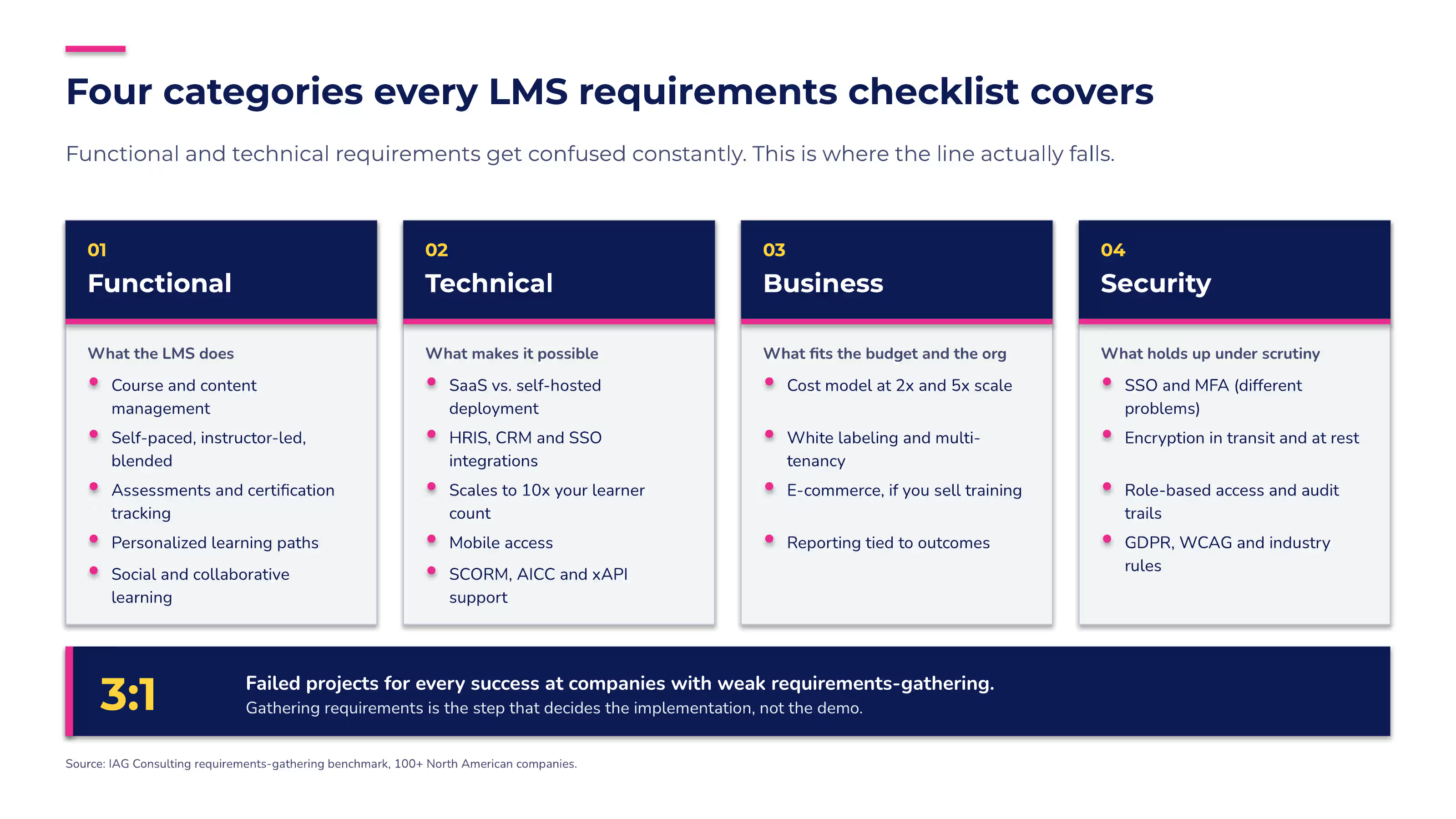
Every "LMS requirements checklist" you'll find is a feature list that tells you what a platform can do, never directly solving what your organization needs. IAG Consulting's benchmark found three failed projects for every success at companies with weak requirements-gathering, across more than 100 North American companies.
This checklist prioritizes every requirement and splits into two lists — one for training your own people, one for training everyone outside your walls.
What is an LMS requirements checklist? (and why a feature list isn't one)
An LMS requirements checklist is a prioritized list of the capabilities, technical specifications, and business needs your organization must confirm before choosing a learning management system. It's not a simple inventory of features a platform happens to offer.
That distinction matters more than it sounds. An LMS features checklist and an LMS requirements checklist get used interchangeably in most buying guides — but a true requirements checklist ties each item back to what your organization needs to solve, not just what a vendor built.
The full term is learning management system requirements — the specific functional, technical, and business capabilities your training program depends on to hit its goals. This piece organizes those requirements into four categories — functional, technical, business, and security.
Then it does the part most checklists skip. It tells you which of those requirements matter most depending on who you're training.
"Building customer education programs that people actually seek out comes down to shifting from training as a requirement to training as a resource. Your content has to be current, your structure has to make it easy to find what you need in the moment, and customers need to feel like they're progressing, not just consuming content. When you get that right, they come back because it's helping them solve real problems, not because someone told them to."
—Laura Malloch, Manager, Customer Enablement, Absorb LMS
Functional requirements — what your LMS has to do
LMS functional requirements are what your LMS needs to do — the day-to-day capabilities that get training built, delivered, and tracked. Here's what to check for.
- Course and content management — importing, organizing, and updating training content without a developer's help.
- Multiple learning models — self-paced modules, instructor-led sessions, and blended formats that combine both, so the delivery method matches the content.
- Assessments and certification tracking — built-in quizzes, scoring, and automatic certificate issuance tied to completion.
- Personalized learning paths — content that adapts to a learner's role, skill gaps, or prior completions instead of serving everyone the same course list.
- Social and collaborative learning — discussion boards, peer feedback, or lightweight gamification like badges and leaderboards that keep learners engaged between formal courses.
Functional and technical requirements get confused constantly. The difference is simple — functional requirements are what the LMS does for the learner and the training team, and technical requirements are what makes that possible under the hood.
Content standards like SCORM and its newer successor, xAPI, sit right at that boundary. xAPI became a formal IEEE standard in 2023, which is part of why so many modern LMS platforms now support it for tracking learning activity beyond a single course player.
Technical requirements — what has to work under the hood
LMS technical requirements determine whether the platform works with the systems, devices, and IT policies you already have. Getting them wrong is the kind of mistake you don't discover until after you sign the contract. Five things to confirm before you commit.
1. Hosting and deployment model
A SaaS LMS serves most organizations better than a self-hosted one, since the vendor handles maintenance, security patches, and uptime instead of your IT team.
2. Integrations and API access
Your LMS needs to talk to your HRIS, CRM, or single sign-on (SSO) provider without custom development work every time one of those systems updates.
3. Scalability
The platform should handle ten times your current learner count without a re-implementation, whether that growth comes from headcount, new markets, or new audiences like customers and partners.
4. Mobile access
MIf your learners are frontline staff, field teams, or customers who'll open training on a phone, mobile moves from convenient to required. Confirm the platform offers a native app or a fully responsive course player, and test a real course on a phone during your trial.
5. Confirm SCORM, AICC, and xAPI support up front
Most modern platforms support all three, but it's worth confirming rather than assuming, especially if you're bringing existing course content with you.
If you're working with an IT team on this evaluation, let them lead the integration checklist. Ask specifically what's supported today versus what requires a paid add-on or a professional-services engagement, especially for SSO and HRIS connections.
Business requirements — what has to work for the budget and the org
LMS business requirements are the commercial and operational terms that determine whether the platform fits your budget and your goals. The right features don't guarantee either one. Four things to weigh.
- Pricing transparency and cost model — per-user, per-active-learner, and flat-fee pricing all shift your total cost differently as you scale; ask for the math at two times and five times your current learner count, not just today's price.
- White labeling and multi-tenancy — matters far more if you're training customers or partners under your own brand than if you're only training employees.
- E-commerce integration — relevant primarily if you sell training content directly, whether that's certification courses for customers or paid content for external learners.
- Reporting tied to outcomes, not just completions — internal training teams need reporting that proves compliance and completion; external training teams need reporting that connects training to product adoption or support-ticket deflection.
The stakes behind that reporting requirement are real. Providing learning opportunities is the top retention strategy organizations report using, according to LinkedIn Learning's 2025 Workplace Learning Report, which also found 88% of organizations are actively concerned about retention. A business requirement that looks like a line item on a budget spreadsheet is, in practice, a retention lever.
If you're trying to build an ROI case for a new LMS, skip the formula. Tie the cost directly to the outcome it protects — compliance risk avoided, admin hours reclaimed, or the retention data above.
Security requirements — what has to hold up under scrutiny
LMS security requirements protect two things at once — your organization's data and your legal exposure. Neither is optional, no matter how small your training program is. Four things to check.
- Authentication — single sign-on (SSO) lets learners use existing credentials; multi-factor authentication (MFA) adds a second verification step for higher-risk accounts. They solve different problems, and most LMS platforms need both, not one or the other.
- Data encryption — your LMS should encrypt training data, especially anything tied to compliance or certification records, both in transit and at rest.
- Role-based access control and audit trails — admins, instructors, and learners need different permission levels, and the platform should log every access change for compliance review.
- Regulatory compliance — any training program touching the EU needs to protect the personal data of learners under GDPR, and every LMS interface should meet WCAG's accessibility guidelines for learners with disabilities, regardless of location. Regulated industries add their own layer on top — healthcare organizations, for example, typically need to confirm HIPAA-relevant safeguards with any vendor before signing.
How to prioritize your LMS requirements by who you're training
Sorting requirements by audience is the fastest way to rank them, and LMS buyers split evenly on which audience comes first. In Capterra's March 2026 LMS buyer insights report, certification and compliance management and extended enterprise capabilities tied as buyers' top priorities at 40% each. That figure comes from advisor conversations with 73 buyers, mostly at small and midsize businesses. One of those priorities serves your employees, and the other serves everyone outside your organization.
Start by deciding which column describes your program. Internal training covers employee onboarding, compliance, and upskilling. External training covers customers, partners, resellers, and members. If you run both, score both columns and plan for the higher rating in each row.
Each requirement gets one of four ratings:
- Must-have: the platform is out if it's missing.
- Important: it should carry real weight when you compare vendors.
- Nice-to-have: a tiebreaker.
- Skip: it doesn't apply to that audience.
Requirement | Internal training | External training |
|---|---|---|
Functional | ||
Course and content management | Must-have | Must-have |
Multiple learning models | Important | Nice-to-have |
Assessments and certification tracking | Must-have | Important |
Personalized learning paths | Important | Important |
Social learning and gamification | Nice-to-have | Important |
Technical | ||
SaaS hosting | Important | Important |
Integrations (HRIS, CRM, SSO) | Must-have (HRIS) | Must-have (CRM) |
Scalability | Important | Must-have |
Mobile access | Important | Must-have |
Content standards (SCORM, xAPI, cmi5) | Must-have | Important |
Business | ||
Pricing model at 2x and 5x scale | Important | Must-have |
White labeling and multi-tenancy | Nice-to-have | Must-have |
E-commerce integration | Skip | Important |
Reporting tied to outcomes | Must-have (compliance, completion) | Must-have (adoption, ticket deflection) |
Security | ||
SSO and MFA | Must-have | Important |
Data encryption | Must-have | Must-have |
Role-based access and audit trails | Must-have | Important |
Regulatory compliance (GDPR, WCAG, HIPAA) | Must-have | Must-have |
What changes when your learners are outside your walls
Eleven of the 18 requirements change rating depending on who you're training.
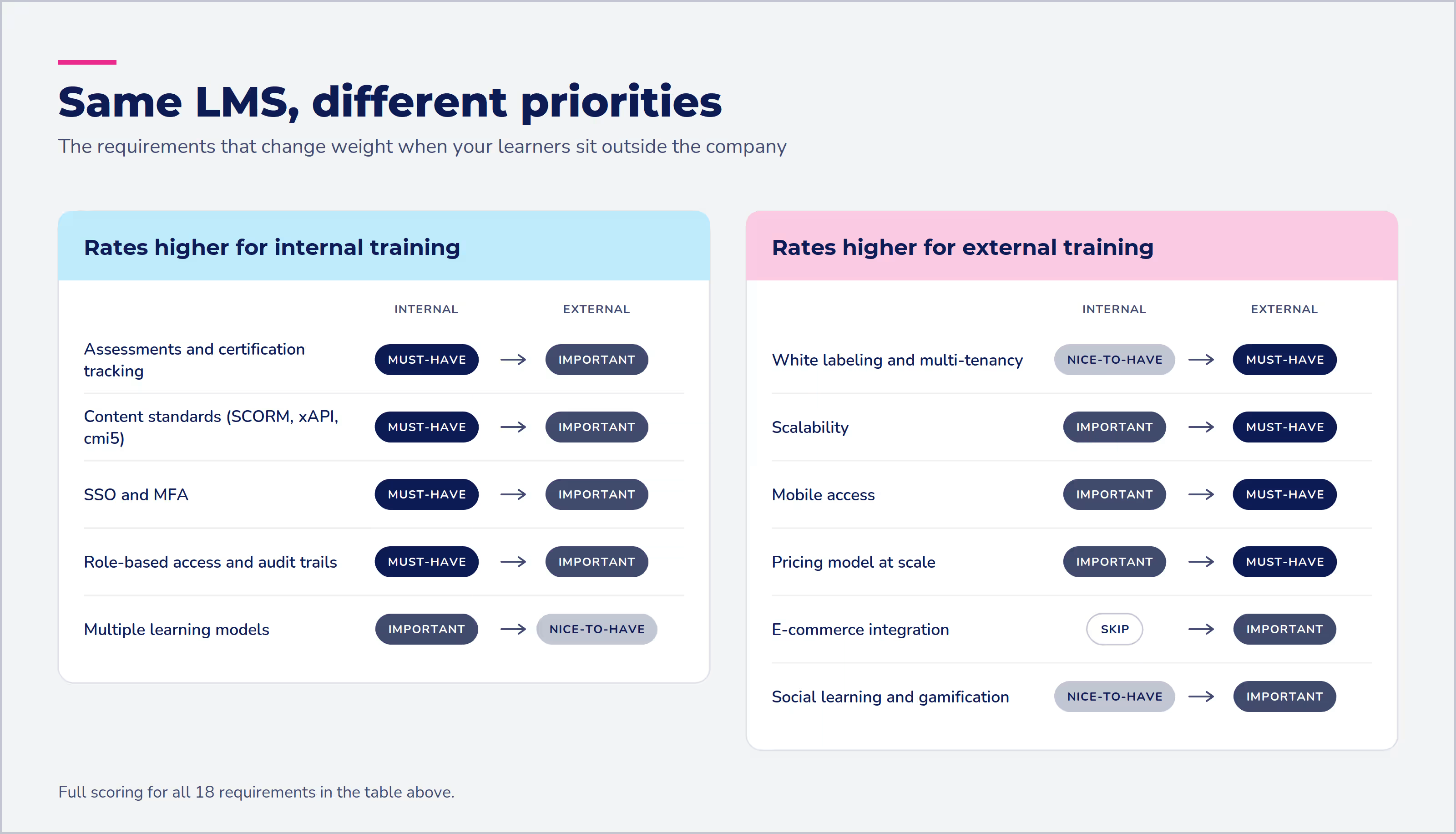
External training pushes brand and volume to the top of the list:
- White labeling and multi-tenancy jump from nice-to-have to must-have. Customers and partners should see your brand, often in separate portals for separate accounts.
- Scalability, mobile access, and pricing at scale all become must-haves. External audiences grow unevenly, learn on whatever device they have, and can multiply a per-user bill fast.
- E-commerce moves from skip to important if you sell certifications or courses.
- Gamification earns more weight with high-volume, low-touch audiences who have no manager assigning their next course.
Internal training pushes proof and control to the top:
- Certification tracking, role-based access and audit trails, and SSO with MFA stay must-haves. Auditors and HR need a record of who completed what and who could see it.
- Content standards matter more, since most internal programs arrive with an existing SCORM library to migrate.
- Blended and instructor-led formats rate higher because onboarding and hands-on compliance training often depend on them.
Two requirements hold the same rating for different reasons. Both audiences need integrations, but internal programs lean on the HRIS connection and external programs lean on the CRM. Both need outcome reporting, but internal teams use it to prove compliance and completion, and external teams use it to connect training to product adoption and support-ticket deflection.
A compliance program and a customer education program can run on the same LMS and still rank more than half this list differently. Scoring both columns before your first demo keeps that difference in front of every vendor you talk to.
Turning your checklist into next steps
Turn the checklist into next steps by bringing it to your first vendor call.
- Ask every vendor the same questions, in the same order — the must-have rows from your prioritized table become your RFP's actual requirements section, not a vague list of "key features needed."
- Push on the things demos gloss over — integration depth, migration support, and true cost at five times your current scale rarely get airtime in a scripted demo unless you ask directly.
- Run a real use case in the trial, not a guided tour — build one course, migrate one real integration, and pull one real report out before you sign anything.
A demo tells you what a platform can do under ideal conditions. Your prioritized checklist tells you whether any of that matters for your organization at all — and that's the question that decides the contract.
Frequently asked questions
What is a requirements checklist?
A requirements checklist is a prioritized list of what you need a product to do, tied to specific business goals, not just a list of what the product offers. For an LMS, that means separating true requirements (what your training program needs to succeed) from features (what a vendor happens to have built). In practice, most buying guides use "LMS requirements checklist" and "LMS features checklist" interchangeably, which is part of why so many of them end up as feature lists in disguise.
What are the prerequisites for LMS training?
The prerequisites split into two sets, depending on who's asking. For your IT team, the prerequisites before rollout are the technical requirements above — SSO and integration access, a content migration plan, and admin accounts set up before launch. For learners, most LMS platforms require nothing more than an account and, for some compliance training, completion of a prerequisite module the system tracks automatically.
What are the top 5 LMS?
There isn't a single "top 5" that fits every organization. The right platform depends on which requirements above matter most for your training program. A platform built for high-volume customer training and one built for tightly regulated compliance training can both be excellent choices, for completely different reasons. Use the prioritized checklist above to build your own shortlist instead of borrowing someone else's ranking.
What are the requirements to become an LMS administrator?
This checklist doesn't answer that — it's about what to look for when buying an LMS, not the skills needed for an LMS administrator job. If that's what you're researching, look for LMS-specific certification programs and administrator training resources instead of a buying checklist like this one.
Score it, split it, then bring it to your next vendor call
A requirements checklist should tell you what to prioritize. Score your own list the way the table above does (must-have, important, nice-to-have, or skip), once for internal training and once for external.
Absorb LMS is built around that same split, one platform that handles the completion tracking and compliance reporting your internal training programs need, and the white-labeled, multi-tenant setup external training programs need. Whichever side of your list is longer, start your next vendor conversation with those must-haves.


.avif)
