





Every learning management system claims dozens of features: course authoring, gamification, compliance tracking, AI content tagging, and more. When you're building a shortlist for your organization, it can be hard to tell which features will move the needle for you versus which ones look impressive in a demo.
This guide gives you both a full rundown of the core features that make up a modern LMS and a way to figure out which ones matter for your specific situation, including your team size, industry, and workforce type.
If compliance training is important to you, you'll also find a closer look at which features will have your back when an auditor comes calling.
What is a learning management system?
A learning management system (LMS) is software that lets you create, deliver, track, and report on training. It's the platform where employees complete onboarding, compliance training runs on schedule, and managers can see who's finished what.
Most LMS platforms handle the same basic job: centralize your training content, enroll the right people, and generate a record of who completed it. But they differ in the depth of features layered on top: reporting, integrations, mobile access, and more, all covered below.
You might also come across the term learning experience platform (LXP) in your research. An LXP leans toward self-directed, recommendation-driven learning, similar to a streaming service for courses.
An LMS focuses on structured, trackable training tied to specific outcomes like compliance or onboarding. Many modern platforms, including Absorb LMS, blend both approaches rather than forcing you to pick one.
Organizations use an LMS to onboard employees faster, keep compliance training current, and, in some cases, train partners or customers on how to use a product.
The right features depend on which of these jobs your LMS needs to do.
Core LMS features to know about
"The main thing every LMS has to be able to do is house SCORM (and at this point xAPI and cmi5) files plus videos and documents, record enrollment and completion information, and allow for some basic reporting. After that, there's a ton of variation."
— r/elearning commenter
This Redditor understands shopping for an LMS. There’s a set of features nearly every organization needs, and a much longer list that only matters depending on your situation.
A five-person team evaluating its first LMS and a 5,000-person company running mandatory safety training need different things, even if they're both searching for LMS features.
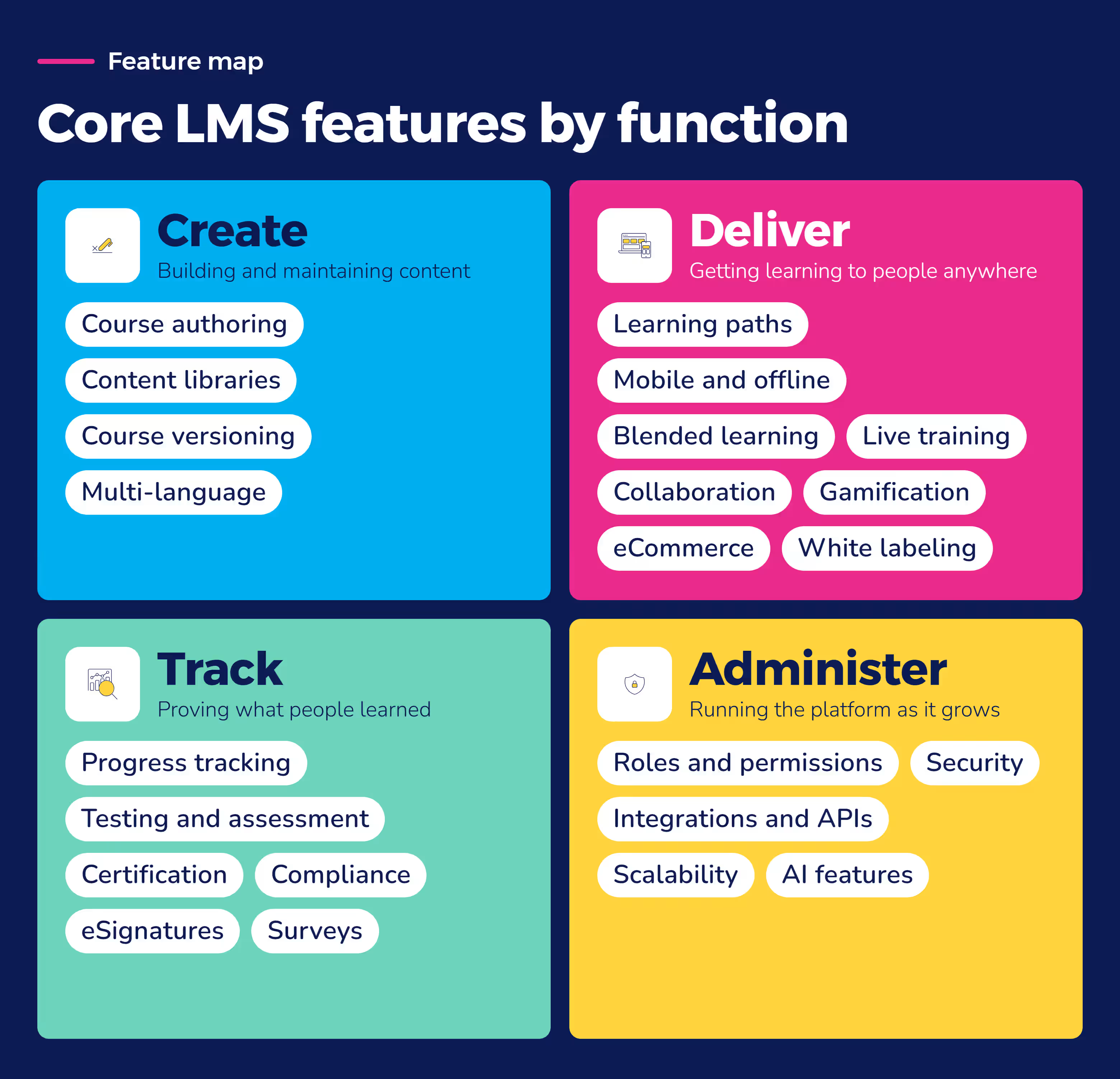
Course and content authoring
Course authoring tools let you build training content directly inside the platform — video, text, quizzes, interactive modules — without needing a separate authoring tool. Look for drag-and-drop course builders, template libraries, and support for common file types like SCORM and xAPI packages, so content built elsewhere still imports cleanly.
This matters if your team creates a lot of original content in-house. If you mostly license or import courses, prioritize import compatibility over authoring depth.
Content libraries
A content library gives learners one place to browse everything available to them, instead of hunting through folders or email links. Organize it by role, topic, or department so people find relevant courses quickly, and look for search and filtering that holds up once your library has hundreds of courses in it — a demo with a handful of samples won't show you that.
Personalized and adaptive learning paths
Personalized learning paths route each learner toward the content relevant to their role, skill gaps, or past performance, instead of assigning everyone the same catalog. Adaptive learning goes a step further, adjusting difficulty or content order based on how a learner performs along the way.
Both features cut down on wasted time. Nobody repeats training they've already mastered.
Reporting and analytics
Good reporting shows more than who finished a course. According to LinkedIn Learning's 2024 Workplace Learning Report, the business outcomes most worth tracking are performance reviews, employee productivity, and retention, not just completion counts.
Look for an LMS that lets you build custom reports tied to those outcomes. Default completion dashboards won't get you there. If your reporting can't connect training to a business result, it's hard to make the case for continued investment.
Third-party integrations and open APIs
Your LMS needs to talk to the systems you already run — your HR software, single sign-on, and often your CRM or content library. Deloitte's 2026 Global Human Capital Trends report found that functions like HR are often built in silos, creating gaps that limit an organization's growth and agility. A disconnected LMS is a common source of that gap.
An open API means your team isn't stuck waiting on the vendor every time you need a new connection. Ask specifically which HR and productivity tools an LMS already integrates with out of the box.
Mobile accessibility and offline access
Employees who aren't sitting at a desk all day still need training, whether that's a retail associate between customers or a field technician between job sites. Mobile access means a reasonable experience on a phone or tablet, not a shrunk-down version of the desktop site.
Offline access lets someone complete or continue training without a reliable connection, then sync progress once they're back online. An LMS doesn't always need a dedicated mobile app, but it needs a genuinely usable mobile experience. A bare-minimum responsive page isn't the same thing.
Security
LMS security features start with data encryption, role-based access controls, and support for single sign-on. If your organization has specific compliance requirements, ask directly which certifications the vendor holds rather than assuming "secure" covers what you need.
User roles and permissions
Different people need different levels of access: a course creator, a manager who only needs to see their team's progress, an administrator who manages the whole system. Granular roles and permissions let you match access to responsibility, instead of giving everyone admin rights or locking non-admins out of the reports they actually need.
Testing and assessment
Quizzes, exams, and skills assessments confirm someone actually learned the material, not just that they clicked through it. Look for question banks, randomization to reduce cheating, and pass or fail thresholds you can set per course.
For compliance-heavy training, assessment results often need to feed directly into your completion records — see the compliance section below for what that looks like in practice.
Certification and compliance tracking
Certification tracking and compliance tracking often get lumped together, but they answer different questions. Certification tracking confirms someone completed a specific credential and flags when it's due for renewal. Compliance tracking confirms an organization met a regulatory training requirement across a whole workforce, rather than for one learner at a time.
A strong LMS handles both automated renewal reminders for individual certifications and audit-ready reporting for organization-wide compliance.
Collaboration and social learning
Discussion boards, peer feedback, and course-based comments let learners help each other instead of relying only on top-down content. This matters more for skill-building and onboarding, where peer context adds real value, than for straightforward regulatory training.
Progress tracking
Progress tracking shows exactly where a learner is in a course or curriculum — how far through, and whether they're stuck somewhere. It's the feature that lets a manager or administrator step in before a deadline, instead of finding out after it's already missed.
Multi-language support
If you operate across countries or employ a multilingual workforce, look for content translation support and a platform interface available in the languages your learners use, not just English with translated course content bolted on.
AI features
AI features on an LMS usually show up as automated content tagging, smart search that understands intent rather than exact keywords, or an assistant that answers learner questions instead of pointing them to a help article. Absorb LMS, for example, includes Aura agents that can answer learner questions directly inside a course and help admins build content faster.
Surveys and feedback
Built-in surveys let you collect feedback right after a course, while it's still fresh, instead of chasing it down separately. Use this to catch content that isn't landing before it becomes a bigger problem.
Blended learning
Blended learning combines self-paced eLearning with instructor-led sessions, whether in person or over video. Look for an LMS that can schedule, track attendance for, and report on both formats in one place, rather than juggling a separate system for live sessions.
Scalability
A platform that works well for 50 learners doesn't always hold up at 5,000. Ask about performance under load, not just published limits, and check whether current customers have grown significantly without needing to switch platforms.
eSignatures
eSignature capture lets learners formally acknowledge a policy or confirm they completed required training, with a timestamped record you can produce later. This is a small feature with an outsized role in the compliance section below.
eCommerce portal
If you sell training — continuing education credits, certification courses, or paid content for external customers — an eCommerce portal handles pricing, checkout, and access all in one place. Canadian Memorial Chiropractic College used Absorb's eCommerce module to price and segment courses differently for faculty, students, and members, without building separate systems for each audience.
Custom branding and white labeling
Custom branding lets you apply your own logo and colors to the learner-facing platform. White labeling goes further, removing the vendor's branding entirely. It’s useful if you're reselling training or running a portal for external partners who shouldn't see your LMS provider's name.
Course versioning
Course versioning tracks changes to content over time, so you can update a course without losing the record of what an earlier version said. This is important if you ever need to show what a learner was actually trained on at a specific point in time.
Live training options
Live training options let you schedule, host, or track instructor-led sessions, whether that's a virtual classroom or an in-person session you still want logged in the LMS. This overlaps with blended learning above, but it should be its own line item if live sessions are a significant part of your program.
Gamification
Gamification adds points, badges, or leaderboards to encourage completion. Vivint, a smart home and security company, runs a recurring gamified event called Compliance Week, a trivia-style game about compliance topics, plus a leaderboard-driven virtual exercise. Its LMS administrator credits both with boosting engagement and completion.
Whether gamification works for your organization depends on your culture; we cover the "is this a gimmick" question directly later in this guide.
LMS features comparison cheat sheet: what matters for your situation
This cheat sheet breaks down what's worth prioritizing based on your organization's size, industry, and workforce type.
Feature | Tier | Who needs it most |
Course and content authoring | Core | Nearly every organization |
Reporting and analytics | Core | Nearly every organization |
Security and access controls | Core | Nearly every organization |
User roles and permissions | Core | Nearly every organization |
Progress tracking | Core | Nearly every organization |
Testing and assessment | Core | Nearly every organization |
Third-party integrations | Core | Nearly every organization, more urgent past a few hundred employees |
Mobile accessibility | Core | Nearly every organization |
Certification and compliance tracking with audit trails | Situational | Regulated industries: healthcare, finance, manufacturing, security |
eSignatures | Situational | Organizations that need signed proof of training completion |
Offline mobile access | Situational | Deskless and field workforces without reliable connectivity |
Gamification | Situational | Onboarding-heavy, organizations focused on engagement, or organizations with a lot of mandatory content |
Multi-language support | Situational | Organizations with a multinational or multilingual workforce |
Blended and live training tools | Situational | Organizations running significant instructor-led programs |
Personalized and adaptive learning paths | Situational | Organizations with varied roles or skill levels across a large workforce |
eCommerce portal | Situational | Organizations selling courses or certifications externally |
White labeling and custom branding | Situational | Training resellers and multi-brand organizations |
Scalability at enterprise volume | Situational | Fast-growing organizations or those above a few thousand learners |
AI features | Situational | Organizations who create a lot of content and manage large content libraries or who need answers in the flow of work |
If your organization sits in a regulated industry — healthcare, finance, manufacturing, or a licensed trade like security and alarm monitoring — certification and compliance tracking with audit trails moves from situational to essential fast. The next section covers exactly what "audit-ready" looks like in practice.
Deskless and field workforces have a similar story with mobile access. A retail chain or field-service company where most employees don't sit at a desk needs offline-capable mobile training, not just a mobile-friendly website. Skip this, and you'll likely see lower completion rates from the group you most need to reach.
Organization size changes priorities too. A small, growing team can usually defer scalability concerns and heavier personalization until headcount or course volume demands it. A large enterprise, especially one with varied roles across departments, gets more value from adaptive learning paths and deep integrations from day one.
Regardless of size, if you're deciding between core LMS features and vendor pricing, the section below on choosing an LMS walks through how to weigh both.
Essential compliance features
Compliance training only works if you can prove it happened. That means specific features, not just a general compliance label:
- Audit trail exports that show exactly who completed what, when, and under what version of the content.
- E-signature capture so learners formally acknowledge policies or confirm completion, with a timestamp attached.
- Certification and re-certification expiry alerts that flag renewals automatically instead of relying on someone to track spreadsheets.
- Version-controlled content so you can show precisely what a learner was trained on, even after the course itself has since been updated.
- Role-based access controls that restrict who can modify training records, protecting the integrity of your audit trail.
Without these features, compliance usually falls back on manual tracking. You rely on spreadsheets, chased-down signatures, and reports assembled by hand right before an audit. It can be slow and error-prone.
When you manage compliance content outside of your LMS, you're taking on an enormous administrative burden that's largely invisible — until something goes wrong. For harassment prevention training alone, there are general requirements for both supervisor and employee specific trainings and many state-specific requirements triggered by employee population. This can lead to over 20 course permutations to track, update, and maintain. The integrated approach handles that automatically, preserving audit history throughout.
— Mike Avery, VP, Product Enablement, Absorb LMS
OSHA has addressed what counts as valid proof of training directly in a standard interpretation letter. As long as safeguards confirm the right employee is being tracked, electronic recordkeeping, including scanned ID cards, is an acceptable way to document training. Most training standards do require a signed certification record identifying who was trained, which is exactly what e-signature capture and audit trail exports are built to provide.
This is also where the distinction between certification tracking and compliance tracking, covered earlier, comes into play. A single employee's expired certification is a certification-tracking problem, but a pattern of expired certifications across a department is a gap that an audit-ready compliance system can catch before it becomes a bigger issue.
Vivint, a smart home and security company, put several of these features to work directly. After being acquired by NRG Energy, Vivint moved to Absorb LMS and tied system access to compliance training completion — employees who haven't finished required training lose access until they do, and Absorb automatically re-enrolls anyone who fails a course attempt.
It's been huge for helping us meet our regulatory requirements, and ensure employees complete its compliance training. In the past, our talent business partners and us would be running reports all the time and trying to chase people down. Knowing there's a real consequence of not finishing your compliance training has helped a lot.
— Kendrick Schut, Instructional Designer and LMS Administrator, Vivint
The results moved beyond compliance completion alone. Vivint cut field technician eLearning time from 24–25 hours down to 8–10 hours, and reduced new-technician time to production from 68 days in 2024 to 39 days by April 2025.
If your organization operates in healthcare or another industry with its own specific regulations, like HIPAA, ask a vendor directly how their audit trail and access-control features map to your specific requirements. General compliance features don't automatically satisfy every industry's rules.
Common questions from LMS skeptics
Does gamification actually improve completion, or is it just a gimmick?
It depends on execution and the mindset of your learners, but the skepticism is fair.
"The flashy features are cool and get attention, but then quickly become a lot less important than quality of life features," as one commenter in r/elearning put it, describing things like bulk user management and single sign-on as the tools that hold up day to day.
Badges and leaderboards aren’t worth paying for if your learners aren’t motivated by them. But, if they are, gamification can be a huge performance booster.
Vivint's experience suggests it works best when it's tied to relevant or mandatory course material. As mentioned previously, the company uses Absorb Engage to run a recurring Compliance Week event, a trivia-style game about compliance topics, plus a leaderboard-driven virtual exercise where employees complete a simulated task and compete on speed.
Its LMS administrator credits both with boosting engagement and improving course completion. These are concrete outcomes, more than decorations layered on top of training.
If you're evaluating this feature, ask a vendor for a specific example of a customer getting positive results from it.
Can an LMS show whether training actually improved performance, or just that people finished it?
Most LMS reporting defaults to activity: who enrolled, who finished, how long it took. That's useful, but it's not the same as knowing training actually worked.
LinkedIn Learning's 2024 Workplace Learning Report found that many L&D teams are still preoccupied with "vanity metrics" — things like satisfaction scores or the number of trainings delivered, regardless of whether they actually worked. The report recommends tracking real business outcomes instead. The top three named were performance reviews, employee productivity, and retention.
To get past activity metrics, look for an LMS that lets you build reports connecting training completion to those outcomes rather than settling for a default dashboard of completion percentages.
Which features actually move the needle on employee engagement?
There's no single feature that guarantees engagement, but a few consistently show up in organizations that get it right: personalized learning paths that route people to relevant content instead of a generic catalog, mobile access that works well enough that people actually use it away from their desks, and reporting that lets managers spot disengagement early instead of after a deadline passes.
Before you take a vendor's word for it, ask a more specific question than whether a feature improves engagement. Ask what completion rates or usage patterns changed for an existing customer after they added the feature.
How to choose the right LMS for your organization
Choosing the right LMS for your needs comes down to four steps.
1. Assess your needs first
Use the comparison chart above to separate what's core for any organization from what matters specifically for yours. Write this down before taking vendor calls. It's easy to get swayed by an impressive demo feature you don't actually need, and harder to remember what you originally set out to solve.
2. Compare features and pricing together, not separately
A cheaper platform missing a feature you need usually costs more in the long run, whether that shows up as manual workarounds or a second tool to fill the gap. Ask each vendor for pricing tied to your specific feature list, not a generic quote.
Decide early whether you want a cloud-based platform, where the vendor handles hosting and updates, or a self-hosted one, where your own IT team takes on that maintenance. Most organizations find cloud-based simpler to manage.
3. Run a real trial or demo
Use your own content and a couple of test users instead of sitting through a vendor-led walkthrough. A demo built entirely around the vendor's sample content can hide how a platform actually handles your specific use case.
4. Check reviews and talk to current customers
Look specifically for customers in your industry or of a similar size. A feature that works well for a 50-person team doesn't always hold up at 5,000, and vice versa.
None of this needs to take long, but rushing it usually costs more time later than it saves now.
Frequently asked questions
What is an LMS and its features?
An LMS, or learning management system, is software for creating, delivering, tracking, and reporting on training. Its core features typically include course authoring or import, enrollment and progress tracking, reporting and analytics, testing and assessment, and certification or compliance tracking.
Beyond that core set, features vary by platform: mobile access, gamification, integrations, and multi-language support are common additions covered earlier in this guide. Which of these matter most for your organization depends on your size, industry, and workforce; see the comparison chart above for a breakdown.
What are the top 5 LMS systems?
There's no single "best" list — it depends on your needs — but the platforms that come up most often are Absorb LMS, Docebo, Cornerstone OnDemand, TalentLMS, and SAP Litmos. Rather than a fixed ranking, the better question is which criteria matter for your situation. Identify your cores requirements, then weigh situational features against your industry and workforce type.
From there, build your own shortlist of two or three platforms that match.
What feature is the best to add in LMS?
There's no single best feature. It depends on what's missing for your organization right now. If compliance is a growing concern, prioritize audit-ready tracking and e-signature capture. If engagement is the issue, look at personalized learning paths and mobile access first.
Use the comparison chart above to identify your specific gap before adding features for their own sake. Adding features without a specific problem to solve is how organizations end up paying for capabilities nobody uses.
What are the key components of an LMS?
At a minimum, you need a course library or authoring tool, an enrollment system, progress and completion tracking, reporting, and some form of assessment. Most modern platforms add integrations, mobile access, and reporting dashboards on top of these basics.
Think of these components as the floor, not the ceiling; what you add beyond them should match your specific training needs.
Can an LMS integrate with other tools my organization uses?
Yes. Most modern LMS platforms integrate with HR software, single sign-on providers, and often video conferencing or content libraries. Look for a platform with an open API and confirm which specific integrations are available out of the box, rather than assuming a claim of "integrates with your tools" covers what you actually need.
A disconnected LMS often becomes a source of duplicate data entry and manual work for administrators, which is exactly the kind of overhead a well-integrated system should eliminate.
Get started with the right LMS
Choosing an LMS doesn't need to be a 6-month process.
Here's what to start with this week:
- Circle your must-haves on the comparison chart: the 3-4 features tied to your industry, workforce, or compliance requirements.
- Book two demos, using your own content and a real test user.
- Ask each vendor one hard question: e.g., a specific customer example, with a real number attached, for the feature that matters most to you.
From there, you'll know within a couple of weeks whether a platform fits your needs.
If you want a head start, Absorb LMS already covers the core requirements in this guide, plus situational features like audit-ready compliance tracking and Absorb Engage for gamification. Organizations using it saw a 490% ROI over three years, according to Forrester. Request a demo to see how it stacks up against your list.
.avif)

.avif)
%2520(1).avif)