


.jpg)


An LMS implementation checklist tells you what to do next, in order, from picking a platform to watching adoption after launch. This one is organized into five phases, with nothing to download and nothing to fill out first.
If you're the HR generalist, L&D manager, or IT lead who now owns getting a new learning platform live, work through this phase by phase and check off what you finish. You'll end up with a completed rollout and a snazzy record of what got done.
“The launches that thrive treat go-live as a starting line. The ones that struggle treat it as a finish line.”
—Angelique K, Absorb Implementation Manager
What's an LMS implementation checklist, and how's it different from a plan?
An LMS implementation checklist is a step-by-step list of the tasks, configurations, and sign-offs you need to complete before, during, and after rolling out a learning management system. Work through it in order and check off each task as you go. (Try to resist skimming.)
A plan sets the strategy, and a checklist carries it out. An LMS implementation plan lays out the overall strategy, timeline, and who owns what across the project. The checklist sits underneath it as the specific tasks that turn that strategy into action. Think of the plan as the roadmap and the checklist as the turn-by-turn directions.
The five phases below are the same "phases of implementation" you'll find in general project-management guides, applied to an LMS rollout. They cover planning, configuration, content and testing, launch, and post-launch monitoring, and each one breaks into the LMS implementation steps you'll check off. You don't need a separate framework.
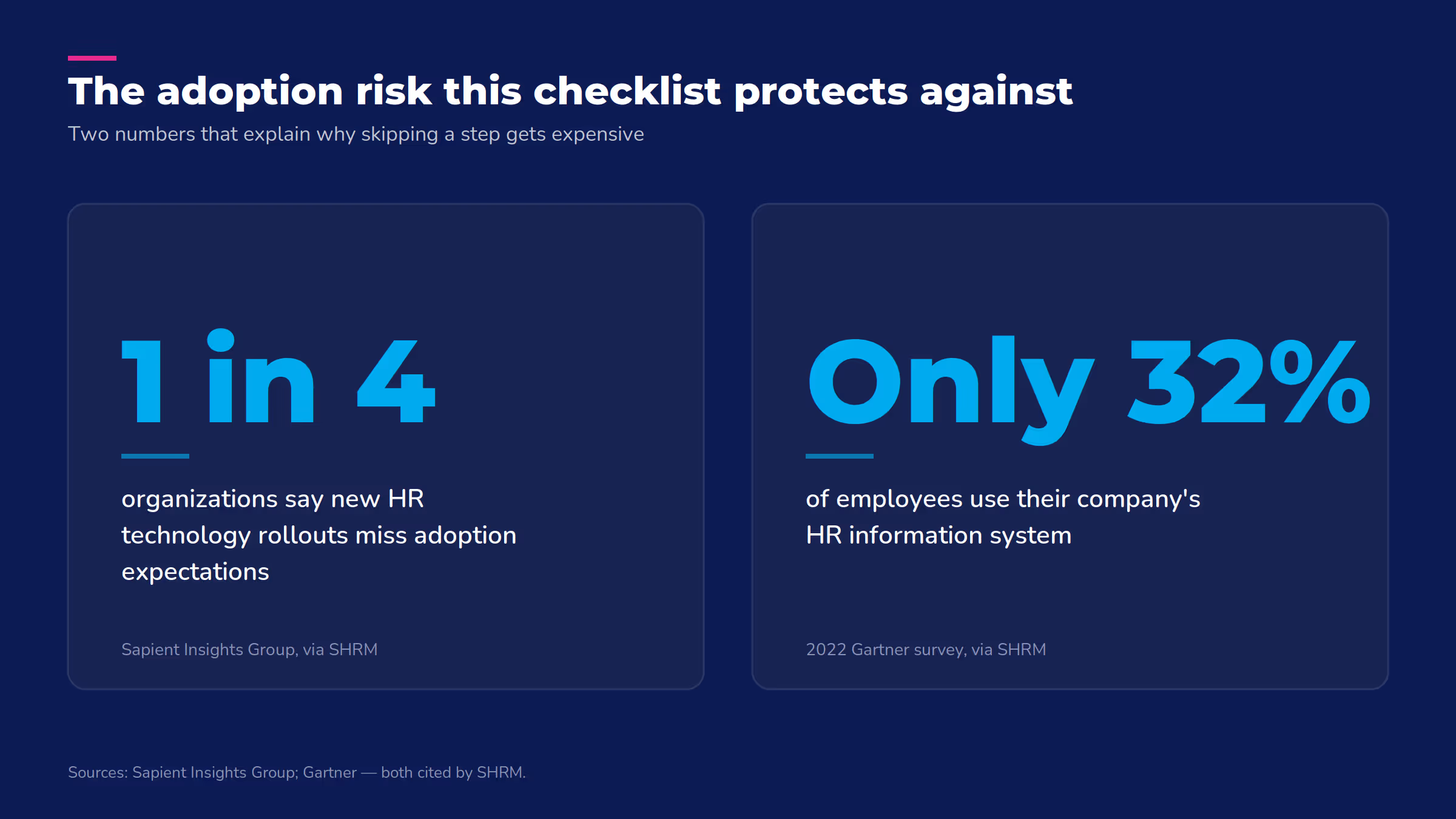
Skipping this structure has a cost. According to SHRM, citing a Sapient Insights Group survey, nearly one in four organizations say their new HR technology rollouts fail to meet adoption expectations, and an LMS falls under that same HR technology category. A checklist won't guarantee adoption on its own. It does remove the risk of skipping a step because nobody wrote it down.
“The question used to be ‘how do we set up the LMS?’ Now it's ‘how do we build a learning environment that keeps evolving with us?’”—Angelique K, Absorb Implementation Manager
The complete LMS implementation checklist
The checklist runs in five phases, and each one builds on the last, so work through them in order.
Phase 1: Planning and team
- Define what success looks like for this rollout (fewer support tickets, faster onboarding, audit-ready training records, etc.)
- Identify your implementation team: a project lead, an IT or admin contact, and one representative from each department that will use the system
- Set a target launch date and work backward to build your timeline
- Assign someone to own communications (who's telling employees what's changing, and when)
- Confirm budget and any contract terms with your LMS vendor before configuration starts
Phase 2: Configuration and data migration
- Set up single sign-on (SSO) so employees can log in with their existing company credentials
- Configure user roles and permissions (who can assign courses, who can only take them)
- Connect your HRIS or CRM integrations so user data stays in sync automatically
- Confirm your existing course content is SCORM or xAPI compatible, or plan for conversion
- Migrate historical training records and validate that the data transferred correctly
- Decide who's responsible for LMS configuration (usually IT, sometimes the vendor's implementation team, often both)
Phase 3: Content and testing
- Upload and organize your learning content into the courses and learning paths employees will actually use
- Run user acceptance testing (UAT) with a small group before anyone else logs in
- Fix anything UAT turns up (broken links, missing content, permission errors)
- Run a pilot or soft launch with one team or department before rolling out company-wide
Phase 4: Launch
- Train administrators first, so they can support everyone else from day one
- Train end users with a short walkthrough, not just a "here's your login" email
- Send the go-live announcement so employees know what's changing and what to do next
- Launch in phases (by department or region) if you're a larger organization, or all at once if you're smaller
Phase 5: Post-launch monitoring
- Track login and course-completion rates in the first 30 days
- Follow up directly with anyone who hasn't logged in yet
- Compare early results against the goals you set in phase 1
- Set a recurring cadence (monthly or quarterly) to review usage and catch problems before they become patterns
How the checklist changes by company size
The tasks above stay the same regardless of size. What changes is how much work each step takes, and how much testing and phasing you need before you're confident going live.
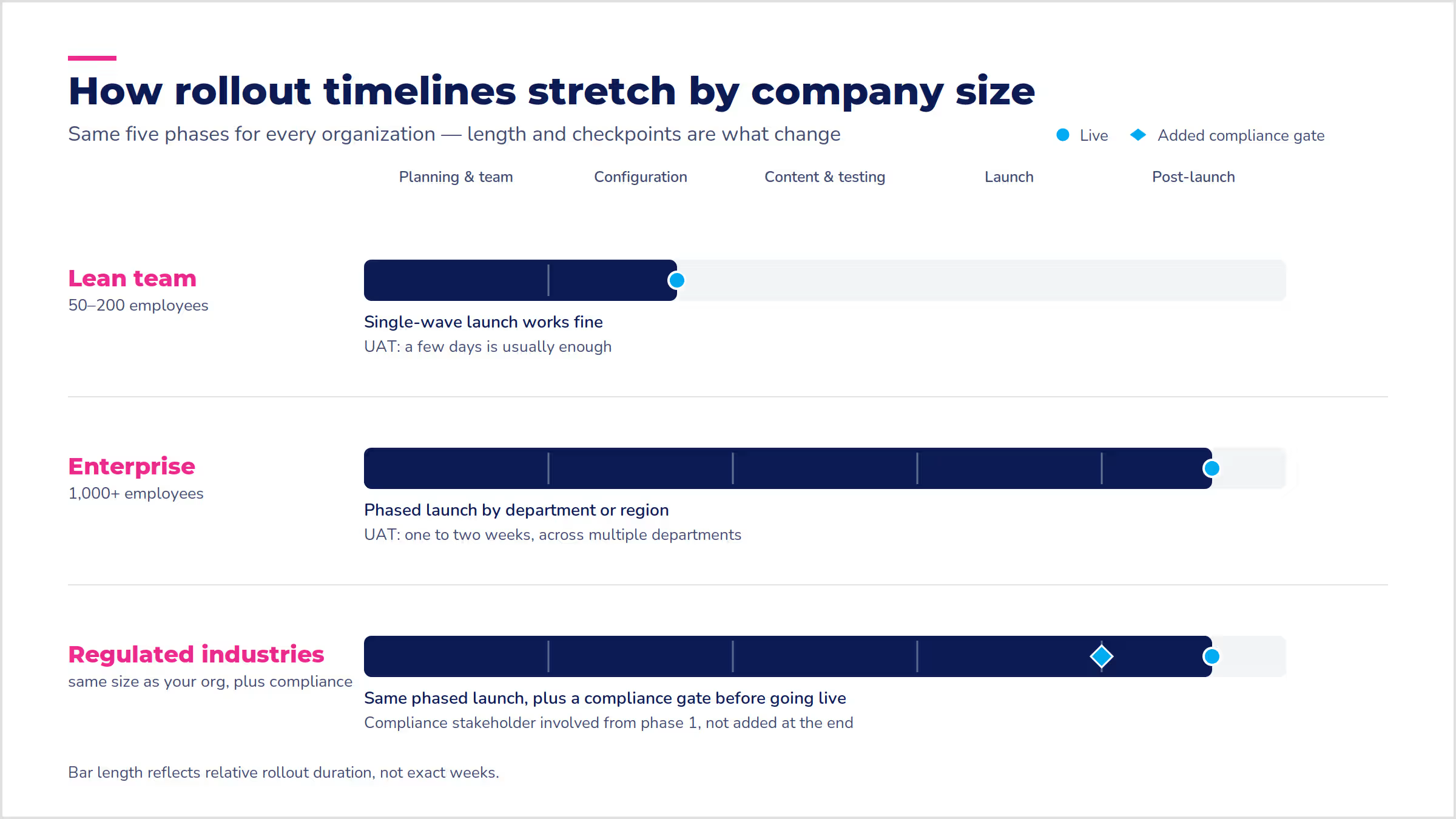
A lean team can usually move through all five phases in a matter of weeks, with one person wearing several hats. An enterprise rollout needs a dedicated team, a longer testing window, and a rollout that happens in waves instead of all at once. Regulated industries add a layer on top of both. The checklist doesn't change, but the sign-offs do.
Lean team (50-200 employees) | Enterprise (1,000+ employees) | Regulated industries |
One or two people can own the whole rollout | Needs a dedicated implementation team with clear ownership per phase | Same team structure as your size, plus a compliance stakeholder involved from phase 1 |
Single-wave launch works fine | Phased rollout by department or region reduces risk | Data migration needs extra validation before any regulated records move over |
A few days of UAT is usually enough | Testing should run for one to two weeks across multiple departments | Sign-off from compliance or legal before launch, not just IT |
What are the most common LMS implementation mistakes?
Most LMS implementation mistakes trace back to a lack of planned support, not a technical misstep. "One of the biggest mistakes LMS buyers make is not defining the level of help and support they will need to successfully implement and support their LMS," says John Leh, founder and lead analyst at the independent research firm Talented Learning.
From there, the most common missteps are familiar ones:
- Not getting the right people on board early, then fighting resistance later when it's harder to fix
- Underestimating how long data migration actually takes, especially with years of historical records
- Skipping the pilot or soft launch to save time, then finding problems after everyone's already logged in
- Under-training administrators, so they can't answer basic questions once employees start asking them
- Treating launch as the finish line instead of setting up a review cadence for what happens after
Poor adoption is expensive to fix after the fact. A 2022 Gartner survey cited by SHRM found that only 32% of employees use the average HR information system. Getting people to actually use the system takes as much planning as configuring it correctly.
How long does LMS implementation take?
At Absorb, most organizations go live in two to six months. A straightforward rollout with clean data, minimal integrations, and a focused scope can happen in about 60 days.
Data migration is usually what stretches the timeline. Moving historical records typically takes at least six weeks, and often 12 to 16 weeks when course content moves too, though that work runs alongside the rest of the checklist.
Other vendors' timelines will vary, but the same factors drive them. How clean your data is, how many integrations you need, and how fast your team makes decisions matter more than company size alone.
What implementation support should you ask your LMS vendor about?
Whatever platform you choose, ask these questions so you don't get surprised:
- Who's my point of contact during rollout?
- What happens if we hit a snag with an integration?
- Is training included, or is that a separate cost?
Some organizations bring in an outside LMS implementation consultant, especially for complex, multi-system rollouts. A consultant can be worth it if you don't have spare IT capacity or you're migrating from several legacy systems at once. If your vendor already provides hands-on onboarding support, you may not need one at all. It's worth asking before you budget for both.
With Absorb LMS, you get a dedicated implementations project manager who works with you through the process above, provides 1:1 training, and can coordinate with our professional services team on integrations, so phases 2 through 4 have someone in your corner, not just a support ticket queue.
That support doesn't stop at launch. Absorb Analyze turns phase 5's post-launch monitoring into something automatic. You get scheduled reports, dashboards that show usage and completion at a glance, and trend graphs that surface performance gaps before they become a pattern, instead of pulling that data by hand every month.
Frequently asked questions
What are the phases of LMS implementation?
LMS implementation typically breaks into five phases. Those are planning and team, configuration and data migration, content and testing, launch, and post-launch monitoring. General project-management frameworks sometimes describe "5 phases" or "5 steps" of implementation more abstractly, but for an LMS specifically, the checklist above is the practical version of that same idea.
What does an LMS implementation consultant do?
An implementation consultant helps plan the rollout, manage data migration, and coordinate integrations, usually for organizations with complex or multi-system environments. They work alongside your vendor's own implementation support rather than replacing it.
Is a training checklist the same thing as an LMS implementation checklist?
No. An LMS implementation checklist covers the one-time work of getting the platform live. A training checklist is what you use afterward, for running individual training sessions inside the system you just implemented.
Getting started
A checklist only does its job if you work through it. Pick your target launch date, then work backward through the five phases above to build your timeline. Start with phase 1 this week: define what success looks like and name who's on your implementation team. Everything else follows from those two decisions.
.avif)

.avif)
.avif)