


.jpg)

When it comes to engagement and training, before you get to the shiny stuff, nail the fundamentals. We're talking session structure, interactivity, and facilitation that respects your learners' time. And on top of that strong foundation, layer in two things most training advice doesn't mention: AI-driven personalization and real gamification mechanics. And always close the loop by proving engagement went up (instead of just hoping it did). Here are 10 specific, research-backed ways to do it.
First off... we're not trying to turn your compliance training into Mario Kart. But a few borrowed video game mechanics, paired with AI capabilities that most virtual-training advice hasn't focused on yet, goes a long way toward making a session feel less like a snoozy, mandatory program. And these aren't just fun trends. The principles game designers use are based in grounded psychological research to increase learner engagement, retention, and stickiness. So why not use them?
From the basics to the fancy-shmancy stuff, below are 10 specific ways to increase training engagement. Standard tactics are foundational, but they're not enough on their own, because every training program runs them now. Use all the levers to stand out!
Why the usual virtual training tips have stopped working
If your virtual training feels flat even though you're running polls and breakout rooms, the problem isn't effort. Those tactics used to be differentiators, but now they're the baseline everyone runs, so they don't register as anything special anymore.
The list of tips are still valuable but they're not the whole answer. The Center for Creative Leadership's 70-20-10 rule puts it in perspective.
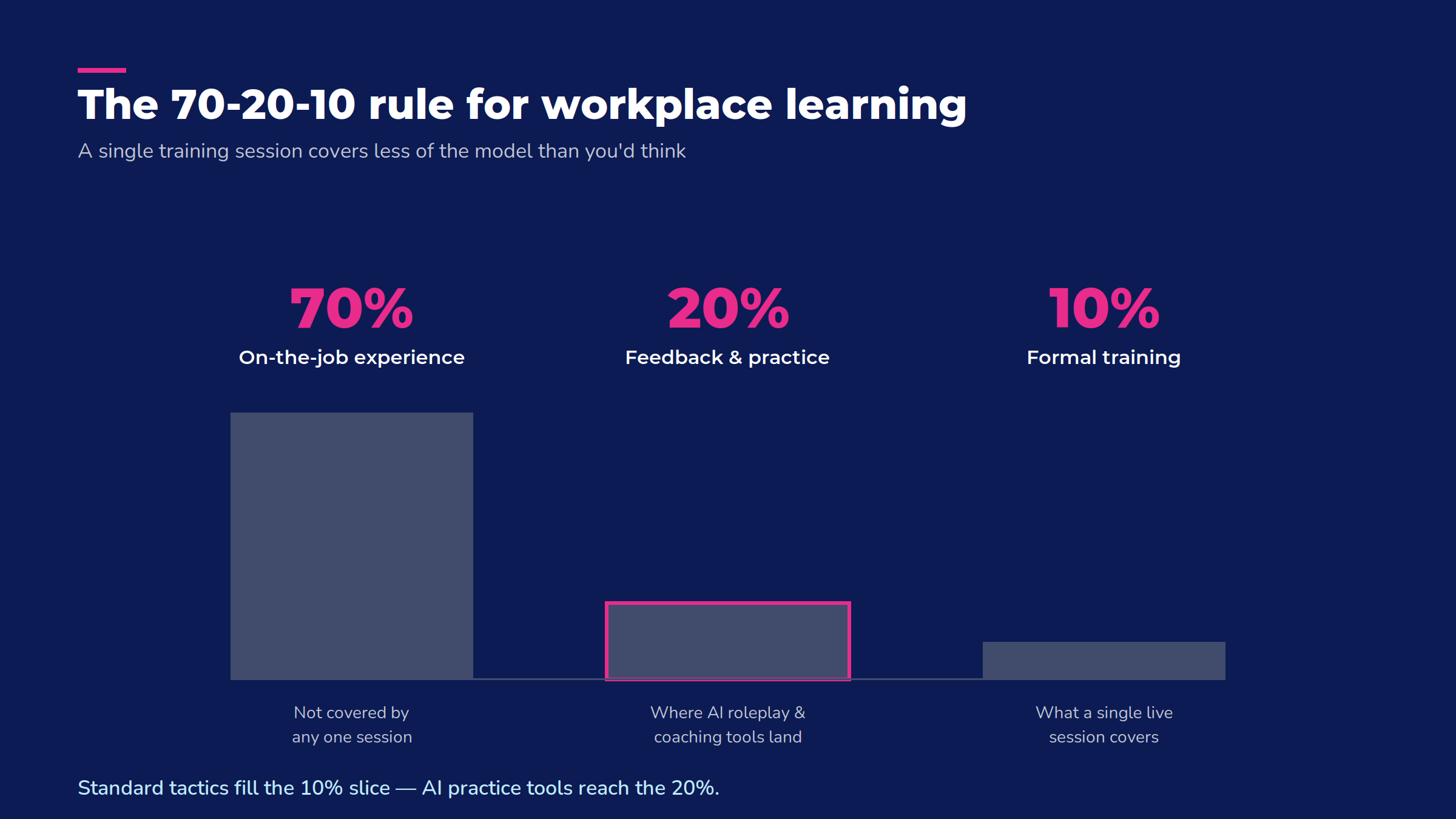
People build skills from 70% challenging experience, 20% relationships and feedback, and only 10% from formal training. A single well-run session, however interactive, is that last 10%. It works best when it's connected to practice and feedback that happen before and after it, not treated as a standalone event.
The 70/20/10 model is a useful lens for upskilling: 70% of real learning comes from on-the-job, hands-on experience; 20% from mentorship, coaching, and relationships; and only 10% from formal training. — Devan Graham, Sr. Human Resources Business Partner at Absorb
Instead of asking "how do I increase engagement in training?" you might ask "how do I increase engagement in virtual learning specifically." And we know what you're up against. You're fighting distraction, camera fatigue, and the pull of a second monitor in a way an in-person room doesn't have. The 10 ways to improve training start with the fundamentals, then build up to AI personalization and gamification to make the other 90% stick.
The fundamentals — tips 1 to 3
1 | Structure your session around shifts, not a fixed timer
You've probably heard that attention drops off after 10 or 15 minutes. A peer-reviewed study of lecture attention found no such pattern. Attention rose and fell throughout a session, with no consistent decline tied to a specific time limit. The real driver isn't a clock — it's whether something changes.
Build your session around shifts, not a fixed timer. Alternate between a short explanation, a hands-on activity, a discussion prompt, and a check-in. Change something roughly every 10 to 15 minutes. Variety is what keeps people with you regardless of the mark.
Also fundamental... keep the agenda visible throughout the session, not just at the start. Tell people how long the session runs and what's coming next. Not knowing how much time is left is its own source of disengagement, separate from the content itself, and it's easy to fix. Pin the agenda in the chat or share it on screen between segments.
2 | Give breakout rooms, polls, and whiteboards a (real) job
Breakout rooms work when they have a specific task and a time limit, not an open-ended "discuss amongst yourselves." Give each group a question to answer or a problem to solve, and have them report back to the full session. Structure helps make things productive and cuts awkward silence.
Live polls and quizzes work best woven through the session, not saved for the end. A quick poll right after a key point checks whether it landed and resets attention at the same time. Virtual whiteboards are useful for anything visual, like mapping a process, brainstorming, or prioritizing options, where typing in chat would flatten the discussion into a scroll nobody reads back.
Don't skip live Q&A, even in a large group. A few unscripted questions do more for engagement than a polished slide deck, because they signal the session is a true conversation, not a one-way broadcast. If people are hesitant to unmute, try a "type a question, I'll read a few out loud" option. It keeps the same energy without the friction of speaking up in front of 50 strangers.
And even in a live setting, microlearning principles apply here too. Break your content into short, focused segments, each with a clear point, instead of one long unbroken block. A 10-minute segment with a beginning and an end holds attention better than a 60-minute stretch that doesn't.
3 | Keep groups small and facilitation tight
Smaller groups engage more. As a rule of thumb, once a session grows past roughly 15 to 20 participants, individual accountability starts to drop, and it's easy for someone to stop interacting. If you're training a larger group, plan for smaller breakout sub-groups throughout the session, not just one big room the whole time.
The most common mistake trainers make is packing in too much content and rushing the interactive parts to compensate when time runs short. If you're deciding what to cut mid-session, cut content before you cut interaction. A shorter session people participated in wins against a longer one that nobody absorbed.
Depending on your group, change up the pacing. 10-person team session can run on discussion and real-time adjustment, changing course based on what the room needs. A 200-person cohort needs more structure planned in advance, because you can't read that many faces at once and improvise the same way.
What the research says about generational learning differences
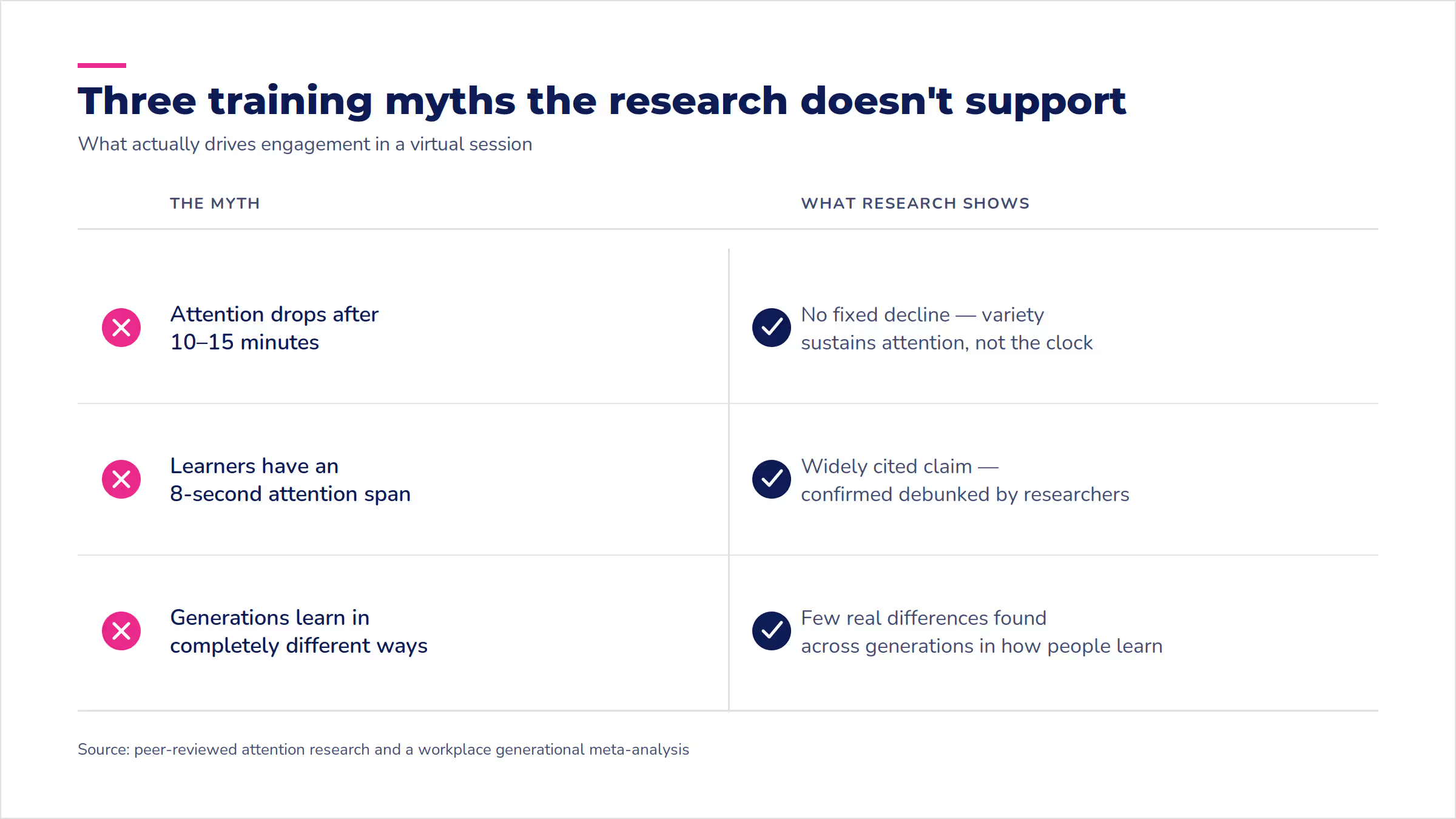
Popular wisdom says younger and older employees learn completely differently, and that's mostly not true. A peer-reviewed meta-analysis of workplace generational research found few meaningful differences among generations across a wide range of outcomes, including how people learn and work. Treating "Gen Z" or "Boomers" as fixed learning types is a weaker starting point than it sounds.
That includes the most repeated attention-span claim in training content. The "8-second attention span" figure gets cited constantly, but King's College London's Policy Institute confirmed the number is widely believed but thoroughly debunked.
But generational data isn't totally useless. Specific surveys do show real preference gaps worth planning around. In a LinkedIn Learning survey (2018), nearly half of Gen Z workers wanted a fully self-directed learning approach, while only 20% of L&D leaders planned to offer that much control. And per Deloitte's 2026 Gen Z and Millennial Survey, 79% of both generations already use AI to find learning opportunities on their own, without waiting for a training team to hand them a course.
Put those two things together, and there's no need to "design different training for each generation." Instead, recognize that individual learners already vary in how much self-direction and AI assistance they want (generation is a weak proxy for that). Personalizing to the person, not the birth year, is what tips 4 through 6 are built to do.
Once the fundamentals above are solid, AI is where you can go further than a live session alone allows. It matches the pace and content to each learner instead of running one version for everyone. This is a lever most virtual-training advice still skips, which makes it one of the fastest ways to differentiate right now.
AI personalization — tips 4 to 6
4 | Personalize the pace with AI
A live session moves at one speed for the whole group. But all your learners are starting from different places. Some already know half the material. Others need more time on the fundamentals than the session allows, and neither group says anything, because who wants to be the person holding up the room?
AI-adjusted content paths solve that outside the live session. Learners who already know the basics move faster through review material. Learners who need more time get it, without either group waiting on the other or the trainer trying to split the difference and serving neither well.
This doesn't replace the live session, but uses AI to shape what happens before and after it, so the time you spend together is used on what needs a person in the room — like real discussion, real feedback, and the kind of questions a self-paced module can't answer.
5 | Let AI run the roleplay practice
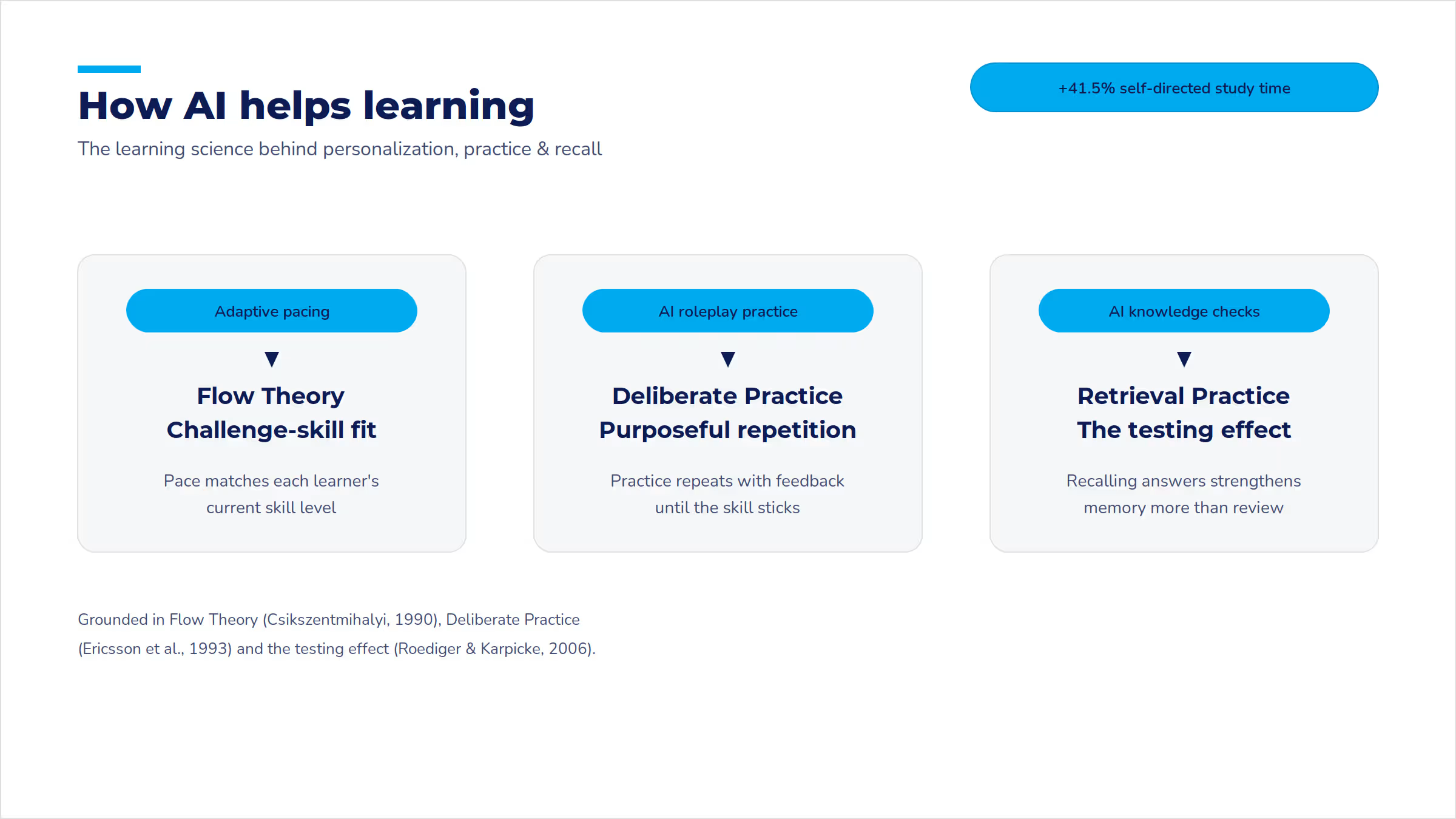
Some skills only develop through practice, and not every learner gets enough of it in a single live session. AI-simulated roleplay lets someone practice a difficult conversation, work through a branching decision scenario, or rehearse a sales pitch as many times as they need, with feedback each time instead of one shot in front of the group.
This fits squarely in the 20% of the 70-20-10 model. That's practice with feedback, not just information delivery. A controlled study of AI-personalized learning found that learners using an AI-personalized platform participated significantly more often in class discussion. Their self-directed study time also increased by 41.5% compared to a control group. That study looked at medical students, not corporate trainees. But the underlying mechanism, content that adapts to where the learner is, applies just as well to workplace training.
Branching scenarios work especially well for situations with real judgment calls, like a difficult customer conversation, a compliance gray area, or a negotiation. The learner makes a choice, sees the consequence, and can try a different path — a kind of repetition a live session rarely has time for one-on-one, let alone for a whole room.
Aura Rehearse (coming soon) will let admins sketch a scenario and persona in plain language, set a weighted rubric, and ground the conversation in the company's own policies and course content, not generic AI knowledge. The learner talks it out with an AI character, and Aura scores the transcript against that rubric — per-criterion feedback, evidence pulled straight from what was said.
Chris Ball, Absorb's Technical Product Marketing Manager, notes "That gap is where training fails, and it's the gap Aura Rehearse closes." Most LMS platforms can tell you someone finished the course. Few can tell you whether they could hold the conversation. Aura Rehearse trades the completion checkbox for a transcript and a score.
6 | Swap the end-of-course quiz for AI-generated knowledge checks
A static end-of-course quiz tests whether someone remembers what was just said, once, at one fixed moment. Knowledge checks generated dynamically from what a learner covered can catch gaps as they happen, rather than waiting until a final exam to find out something didn't land three sections ago.
Used well, this turns assessment into part of the learning process instead of a hurdle at the end of it. A learner who misses a question on a specific concept can get a short, targeted follow-up on exactly that concept, rather than being sent back through content they already understood. The goal is testing that tells you something and does something with what it learns.
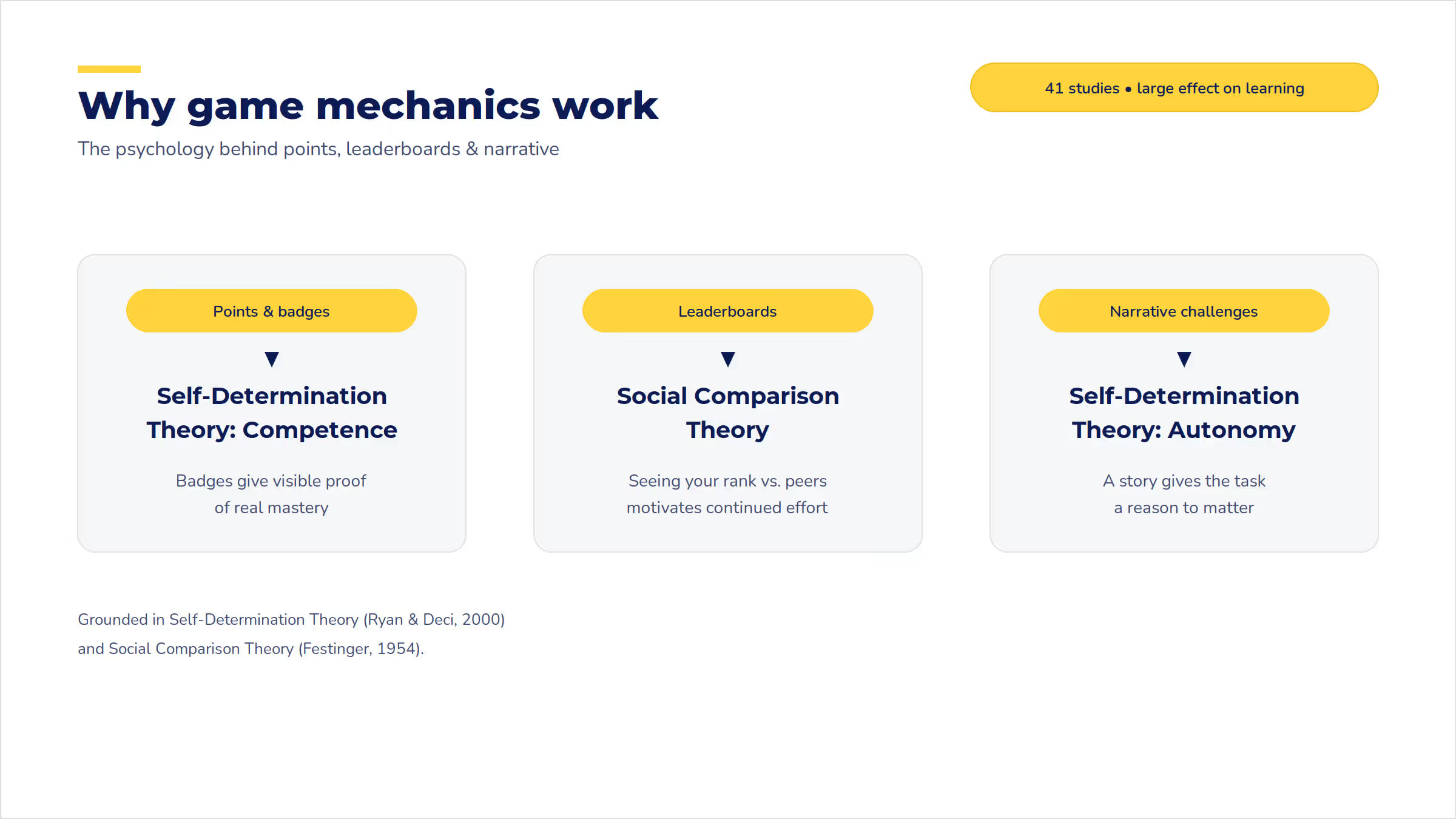
Gamification gets mentioned a lot in training advice, usually as one line: "add a game." That totally undersells it. Used well, game mechanics tap into the same motivators that keep people playing games for hours, like progress, competition, and story, and point them at your training content instead. A large-scale meta-analysis of gamification research, covering 41 studies and more than 5,000 participants, found gamification produced a significant, sizable improvement in learning outcomes across the studies reviewed — a strong case for treating it as a real design choice across tips 7 through 9, not something you bolt on at the end if there's time left.
Gamification — tips 7 to 9
7 | Add points and badges tied to real skill milestones
Points and badges work because they make progress visible. Completing a module feels different when a badge appears than when nothing changes on the screen. It's a small signal, but it's a visible one, which is exactly why a completion checkmark alone rarely feels like an accomplishment.
Keep the criteria clear and the rewards tied to actual skill milestones, not just attendance or time spent logged in. A badge for "completed the module" is weaker than a badge for "correctly handled three difficult customer scenarios," because the second one means something was actually demonstrated, not just clicked through.
8 | Turn cohorts into friendly competition with leaderboards
Leaderboards work best with teams or cohorts who already know each other, where a little friendly competition motivates rather than discourages. They work less well in a one-off session full of strangers, where ranking against people you've never met just feels arbitrary and maybe a little cold.
If you use a leaderboard, rank by improvement or participation, not just raw score. That way learners who start behind still have a reason to stay engaged, instead of checking out the moment they see they're near the bottom on day one.
9 | Wrap content in a story with real stakes
The most memorable gamified training wraps content in a story with real stakes, like a simulated crisis to manage, a client to win, or a mystery to solve using what the module just taught. This works because it gives learners a reason to apply the content immediately, instead of filing it away for a "someday" that rarely comes.
A narrative doesn't need to be elaborate to work. Even a simple frame, like "you're the on-call manager and this ticket just came in," turns a compliance module into a decision, which is a lot more memorable than a list of rules nobody asked for.
Mechanic | What it does | Why it works |
Points and badges | Makes progress visible in real time | People stay motivated when they can see how far they've come |
Leaderboards | Ranks performance across a cohort or team | Light competition drives repeat engagement, especially among people who already know each other |
Narrative challenges | Frames content as a story with a goal | Learners apply what they just learned immediately, which helps it stick |
What engaging virtual training looks like
Here's what tips 4 through 9 look like in practice.
An AI-personalized example
A new hire moves through onboarding content at their own pace, skipping ahead on topics they already know from a prior role, then joins a live session focused entirely on what's new to them. Nobody sits through material they don't need, and the trainer isn't re-explaining basics to half the room while the other half checks their phone.
A gamified example
A sales team works through a product training module structured as a series of client scenarios, earning points for each one handled well, with a team leaderboard tracking progress toward a shared goal. The training doubles as practice for the actual job, not a separate task competing for their time.
The one to avoid is a 90-minute session with no agenda shared in advance, a single 60-minute unbroken lecture block, and one quiz at the very end. No breaks, no interaction until the content is already over, and no way to tell whether anything landed until it's too late to fix it. It has all the ingredients of "training" and none of the ingredients of learning.
Proof! — tip 10
10 | Track completion, score lift, and time-on-task
You'll know that your leveled-up training worked if completion rates go up, assessment scores improve, and learners spend more time engaging with the material instead of dropping off early.
Completion rate is the simplest signal. Are people finishing what they start? A jump in completion after you change your session structure is a direct sign the change worked.
Score lift on post-training assessments tells you whether the content is landing, not just whether people showed up and clicked through. Time-on-task, meaning how long learners actually spend engaged with material versus how long a module sits open in a browser tab, separates real attention from passive presence.
Most L&D teams are spending more on training, not less. According to ATD's 2026 State of the Industry report, the average number of learning hours per employee rose to 16.7 in 2025, up from 13.7 the year before. And if your organization is one of those ones investing more time in training, you need a way to show that investment is paying off with impact.
Absorb LMS reporting surfaces completion rate, score lift, and time-on-task automatically, so you're cobbling this all together by hand after every session.
Frequently asked questions about engaging virtual training
How do I make training more effective, not just more fun?
Effectiveness comes from connecting what happens in a session to practice and feedback afterward, per the 70-20-10 model above. Fun helps people show up and pay attention. It's not the same as retention, so build both in.
How do I make training fun and interactive for adults without it feeling unprofessional?
Tie any game element or activity to real content and real stakes, not just novelty. Adults respond well to a well-designed challenge that respects their time and expertise, and tune out anything that feels like a gimmick.
What are some fun activities for online classes for adults?
Scenario-based roleplay, a timed group challenge with a clear goal, and a points-based module with visible progress all work well. Each one ties directly to applying the content, not just passing time.
What virtual workshop ideas work well for engagement?
The same principles apply: short segments, a specific task per breakout, and a visible way to track progress. A workshop format usually allows for more open-ended collaboration than a straight training session, which is worth using.
What engagement tools exist for virtual learning?
Polling and quiz tools, virtual whiteboards, and breakout room features cover the interactive fundamentals. For the AI and gamification layers, look for a training platform that builds in adaptive content paths and progress tracking, rather than bolting on a separate tool for each.
What's the difference between interactive and engaging virtual training?
Interactive means learners are doing something, like clicking, typing, or talking. Engaged means they care about the outcome. A session can be interactive without being engaging if the activities feel disconnected from anything the learner needs. Aim for both.
Why does virtual training feel more boring than in-person training?
Distraction is closer at hand, like a second monitor, a phone, or an email notification. In-person training removes those options by default. Virtual training has to work harder to hold attention because it's competing with everything else on a learner's screen.
How much "fun" is appropriate for corporate virtual training?
As much as it takes to keep people engaged, as long as it's tied to real content. The test isn't whether something feels playful. It's whether it helps the material stick. A well-designed game mechanic that improves retention is worth more than a somber session people forget by the next day.
Putting the 10 tips together
Start with the foundational tips 1 through 3. Get those fundamentals solid before you bring in AI and gamification. When you're ready, try layering in one AI tip (4, 5, or 6) and one gamification tip (7, 8, or 9), instead of trying all six at once. Then get the proof. Track completion, scores, and time-on-task, and to see how your engagement efforts are paying off for your business.

.jpg)
.avif)