.jpg)



Most organizations haven't set formal rules for how employees use AI, which leaves individual employees to make judgment calls moment by moment. AI adoption has outpaced workplace policy, and questions have piled up faster than answers: whether you disclose when a tool is involved, whether you verify what it tells you before treating it as fact, and whether sensitive information stayed where it should have. This piece walks through situations that come up often for anyone using AI at work, and what to do in each one. If you're looking for general etiquette tips for work, check here.
How should companies address ungoverned AI use?
Companies should treat AI use as a measurable standard, not something employees are left to work out on their own, by building it into onboarding and ongoing training. Unspoken norms around AI create real, avoidable risk to data security, client relationships, and reputation when they go unaddressed.
What's workplace AI etiquette?
Workplace AI etiquette is the judgment you apply to using AI around other people: what you disclose, what you verify, and what you keep out of tools your company hasn't approved.
Why does workplace AI etiquette matter now?
AI use at work has gone from a minority habit to a majority one in about two years. Gallup's tracking data puts current U.S. workplace AI use at 52%, up from 40% a year earlier and 21% in 2023, so most companies' norms simply haven't caught up to how fast adoption moved.
As AI tools become part of daily work, how people use them shapes trust, quality, and risk across the whole organization. Here is a closer look at why workplace AI etiquette deserves the same attention as any other professional standard:
- Trust stays intact: Disclosing when AI helped shape something keeps colleagues and clients confident in what they are getting, and protects the credibility you have built with them.
- Quality holds up: Verifying an AI-generated statistic, quote, or citation before it reaches a client deck prevents a small shortcut from becoming a costly correction later.
- Compliance and security stay protected: Keeping proprietary data and client information out of public AI tools avoids exposing information a company cannot easily take back.
- Collaboration keeps its human core: Crediting the people behind an idea, not just the tool used to write it up, preserves the recognition that keeps teams motivated to keep contributing.
- Productivity compounds: Used thoughtfully, AI frees people to spend more time on judgment calls, relationships, and strategic thinking — the work only a person can do well.
Pro tip: Rolling out an AI-literacy module through your LMS gives every employee a consistent, up-to-date understanding of what responsible AI use looks like, instead of letting habits form ad hoc or waiting for a policy memo to trickle down.
See how Absorb's Aura Create can help you put together AI training.
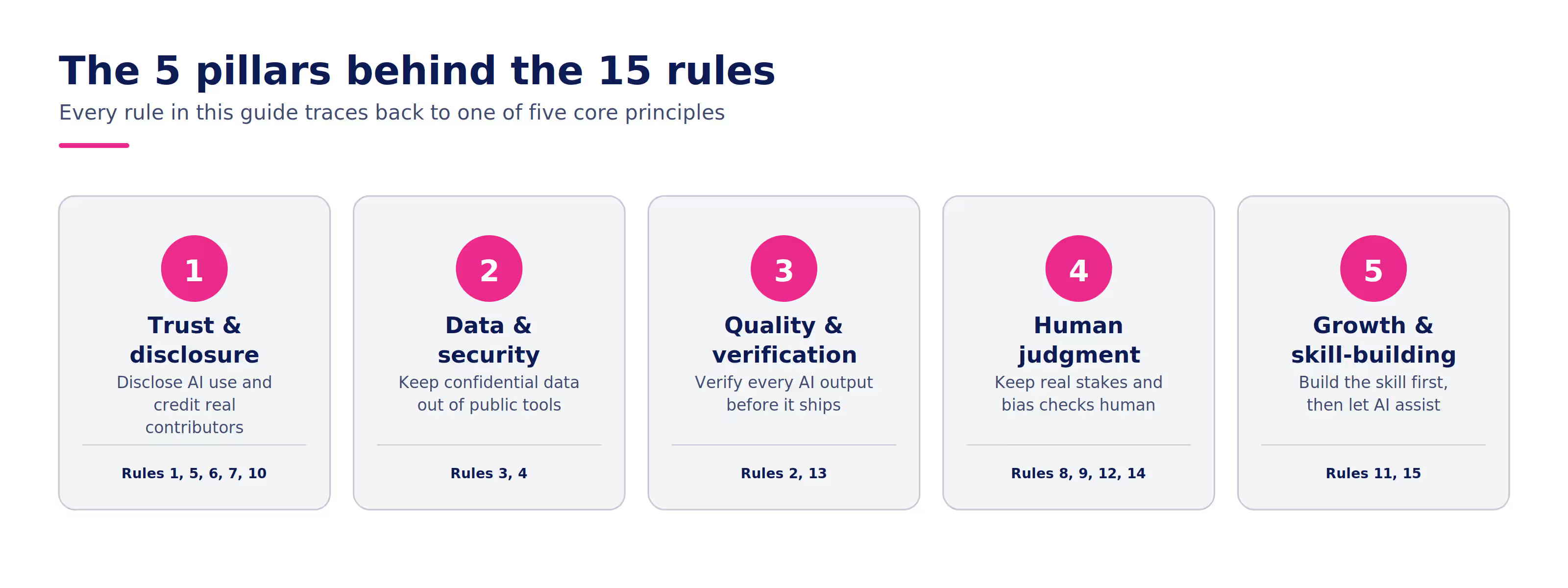
15 golden rules of workplace AI etiquette
In any workplace, how you use AI can make as real a difference as how you show up to a meeting or answer an email. So, which rules matter most? Here are 15 workplace AI etiquette guidelines to help your team build trust, protect quality, and get real value out of these tools without cutting corners.
1. Disclose when AI did the heavy lifting
When you use AI to draft, summarize, or generate something you are sharing with someone else, say so. Whether it is a report, an email, or a first pass at a proposal, a quick note that AI helped shape it keeps expectations honest. For example, "I used our AI tool to draft this outline, then edited it," takes a few seconds and tells the reader exactly how much of a human hand touched the final version.
2. Verify before you send it anywhere
AI tools produce confident, well-formatted answers that are sometimes wrong. Treat every statistic, quote, name, and citation an AI hands you as a draft claim, not a fact, until you have checked it against a real source. A polished paragraph with a fabricated number in it does more damage than a rough one with an honest gap.
3. Keep confidential information out of public tools
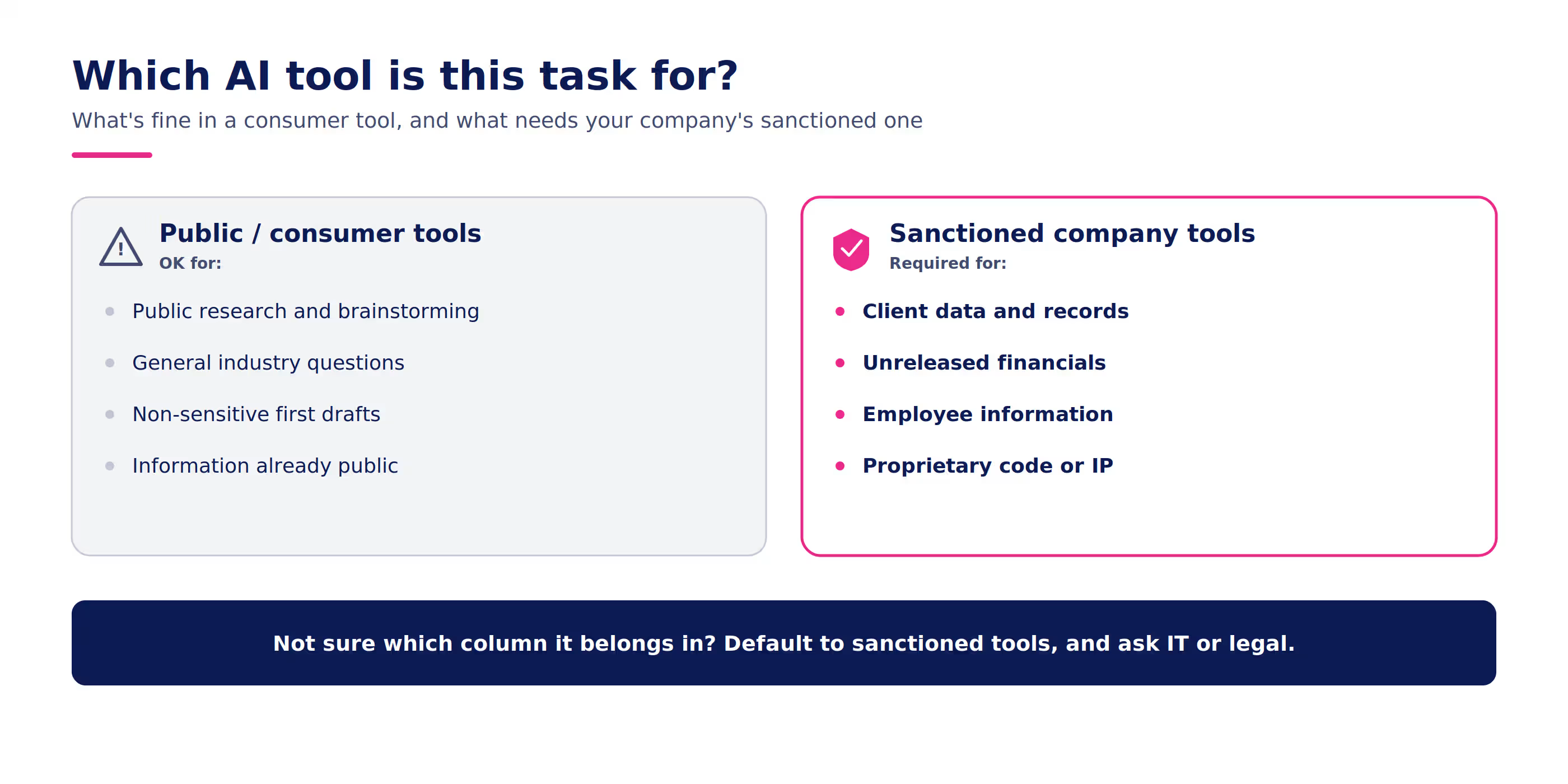
Never paste client data, unreleased financials, employee records, or proprietary code into a consumer-grade AI tool. Once that information goes in, you generally lose control over where it goes. Stick to your company's approved, secured AI tools for anything sensitive, and check with IT or legal if you are unsure whether something qualifies.
4. Stick to sanctioned tools, not shadow AI
Signing up for a new AI app because it looks useful, without clearing it with IT or your manager, creates the same risk shadow IT always has. Shadow AI can quietly expose company data to tools nobody has vetted. If your team's approved list does not cover what you need, ask before you go around it.
5. Never let AI put words in someone's mouth
Do not use AI to invent a quote, attribute a statement to a real person, or fabricate a testimonial, even in a low-stakes draft. If a quote did not come from the person it is credited to, it does not belong in the deck, the article, or the email. This one matters even more as AI-written content becomes harder to spot on sight.
6. Keep your own voice in anything client-facing
A first draft from AI is a starting point, not a finished product, especially for anything a client, prospect, or executive will read. Take the extra few minutes to edit it into your voice, or your team's established tone, before it goes out. A generic-sounding email under your name can cost more trust than the time it saved.
7. Announce AI notetakers before the meeting starts
If you are bringing an AI transcription or notetaking tool into a call, say so at the start, the same way you would mention if you were recording. Give people the chance to ask questions or opt out if the conversation covers something sensitive. A quick "I've got our AI notetaker running so I can stay present in the conversation" covers it.
8. Keep judgment calls with real stakes in human hands
Use AI to help draft feedback, summarize options, or organize your thinking. Do not let it make the call on things like a performance review, a hiring decision, or a disciplinary conversation. Those decisions carry consequences for a real person's job and deserve a human's full attention, not a summary someone skimmed.
9. Check AI output for bias before you act on it
AI tools reflect the patterns in the data they were trained on, which means their outputs can carry the same biases that show up in that data. This matters most in anything touching people, such as resume screening, performance language, or promotion recommendations. Read outputs with a critical eye, and flag patterns that seem to consistently favor or overlook the same kinds of people.
10. Give credit to the people, not just the tool
If a colleague did the real thinking behind a strategy and you used AI to help write it up, credit the colleague, not the software. AI is a tool in the process, the same as a spreadsheet or a whiteboard. The people who did the strategic thinking still deserve the acknowledgment.
11. Use AI to build your skills, not replace them
If you are new to a skill, resist using AI to skip the parts of the work that teach you something. Draft the first version yourself before asking AI to help refine it, especially early in your career or in a new role. The tool works best as a second pair of hands, not a substitute for learning how the work gets done.
12. Read the room before you reach for AI
A perfectly polished, clearly AI-assisted message can land badly in the wrong moment, like a note of condolence, an apology, or a sensitive one-on-one. Some situations call for something visibly, imperfectly human. If you would hesitate to tell the recipient that AI helped write it, that is usually a sign to write it yourself.
13. Report bad (or questionable) AI output, don't just work around it
If an AI tool gives you something wrong, biased, or strange, tell whoever manages that tool internally instead of quietly fixing it and moving on. That feedback is how a company catches a systemic problem before it reaches someone else's desk. Treat it the same way you would report a bug.
14. Respect that not everyone's at the same comfort level
Some colleagues have built AI into their daily workflow. Others are cautious, skeptical, or simply new to it, and that is a reasonable place to be. Do not assume everyone wants an AI-drafted version of everything, and do not make someone feel behind for wanting to do something the traditional way.
15. Keep learning as the tools change
What counted as reasonable AI use six months ago may already look outdated, and the etiquette around it will keep shifting as the tools get better. Build in time to keep learning: new features, new risks, new norms your company adopts. Treating AI literacy as a one-time training misses how fast the ground is moving.
10 common AI decisions at work, and how to get them right
There's no single rulebook for this, but most situations boil down to ten recurring moments. Here's a quick-reference table, followed by the full thinking behind each one.
# | Moment | Quick answer |
|---|---|---|
1 | AI helped shape what you're sending | Say so |
2 | You're using an AI notetaker in a meeting | Mention it once the call starts |
3 | AI hands you a fact, quote, or number | Confirm it before you repeat it |
4 | You're about to paste sensitive details into a public AI tool | Don't. Use an approved tool instead |
5 | AI screens resumes or drafts review feedback | Keep the decision with a person |
6 | You're about to send an AI-polished client message | Edit it into your own voice first |
7 | You need to deliver hard news to the team | Write it yourself |
8 | You're learning a skill AI could do for you | Do it yourself first, then bring AI in |
9 | An AI tool gives you a wrong or biased answer | Report it, don't patch it yourself |
10 | Some coworkers use AI more than others | That's fine. Let people set their own pace |
Frequently asked questions about using AI at work
Is it okay to use ChatGPT, Claude, Gemini, or any AI tool, at work?
It depends less on the tool and more on what you put into it. The real risk is shadow AI, using tools your IT or compliance team never signed off on. AI-linked data breaches now cost organizations upward of $650,000 per incident on average, according to ISACA, the global IT governance association, citing IBM's 2025 breach-cost research. Default to whatever your employer has already approved, and loop in IT before reaching for anything else.
I used AI to help write something I'm about to send. Do I need to say so?
If it shaped the content in any real way, yes. Add a line like "AI helped draft this section, and I reviewed the numbers," so nobody has to guess afterward how much of what they're reading came from you.
I want to use an AI notetaker during a call. Do I mention it?
Yes. Bring it up out loud once things get started. People deserve to know a transcript exists before they say something they'd rather not see written down later.
AI gave me a number or a quote for something I'm presenting. Should I use it as is?
Not until you've checked it somewhere real. AI tools sound just as sure of themselves when they're wrong as when they're right, so their confidence isn't a signal you can trust on its own.
Ify Anazia, Absorb's Senior GRC Analyst, has seen the cost of skipping that step in compliance work specifically: "The moment AI starts hallucinating regulatory requirements, it creates genuine risk. The promise is there, but it has to be grounded in reliable, verified information." That standard holds outside compliance too. If you pass along a number you never checked and it turns out to be wrong, you're the one who has to walk it back with whoever received it, an awkward conversation a two-minute check would have prevented. The same goes for letting a tool invent a quote and attach a real person's name to it.
I'm thinking about pasting client details or internal numbers into a public AI tool. Good idea?
No. Keep that kind of material inside whatever tools your company has vetted, whether that's an internal system or an enterprise AI license with real data protections. If you can't tell whether something's off-limits, ask first rather than finding out after the fact.
AI helps our org screen resumes or draft feedback for a performance review. Is this fine?
AI might help you sort through resumes or pull feedback into shape, but decisions need to stay with a person, since it affects whether someone gets hired, promoted, or let go. That matters even more given what a 2025 academic benchmark study on AI resume screening found: Every large language model it tested carried some measurable racial or gender bias, though how much and in which direction varied by model, and the researchers called for urgent fixes. If AI touches hiring, evaluations, or promotions anywhere in your workflow, that finding is a reason to look closely at the output, not wave it through.
I have a polished, AI-drafted message ready to send to a client, customer, or leadership. Send it as is?
Give it a pass in your own words first. If a client or your boss can tell the words aren't really yours, they'll start reading everything else you send a little more skeptically. And when a teammate is the one who worked out the actual approach, her name belongs on that idea when you bring it up later, even though AI helped you turn it into a clean write-up.
Can I use AI to write sensitive messages?
No. Humanity matters too much for a lot of sensitive communications. Sit down and write it yourself, even if it comes out rougher than something AI would produce. A stiff, well-formatted paragraph in a moment like this can land as more distant than a shorter note that's obviously coming straight from you.
I have a brand new task AI can do faster and easier. Go ahead?
Maybe not. Work through it on your own the first time, and bring in AI afterward only to sharpen what you've already built. Skip that step and you won't find out what you don't understand until it matters a lot more than it does right now.
An AI tool's answer isn't sitting right. What do I do with it?
Tell whoever's in charge of that tool at your company instead of patching it yourself and staying silent about it. If nobody says anything when something's off, the same mistake shows up again for the next person who trusts the tool without a second thought.
Some of my coworkers lean on AI constantly, and others barely touch it. Is that a problem?
This depends on your workplace policies, but if AI is new for your organization and if everyone's experimenting, people are allowed to move at different speeds here. Gaps and imbalanced usage tends to close on its own once a team trains toward the same shared standard, instead of leaving each person to land wherever they happen to be comfortable, which is where onboarding and ongoing training come in.
How to use AI at work, the right way
Whether you call it AI for work or part of the job now, using it well starts with reaching for a sanctioned tool before an unapproved one, even when the unapproved one is closer at hand. Before you type anything into an AI tool, check what data the task involves, whether that data is allowed there, and whether the result needs a human look before it goes anywhere.
From there, treat what comes back as a rough draft or an extra pair of hands rather than a finished answer. Mention it when it did real work, confirm anything factual, and keep it away from anything sensitive. People now reach for AI for all kinds of small tasks, from cleaning up meeting notes to sketching a rough outline for a proposal, but how much you can hand off versus how much you should keep in your own hands depends on who's affected if the result turns out wrong.
Train your team to use AI responsibly
None of this is particularly useful if it only lives in one person's head — like yours! Building AI etiquette into onbording, and revisiting it as tools change, turns it into something the whole team shares rather than something each new hire has to figure out alone.
That starts at the top. Kimberly Williams, Absorb's CEO, has made the case that teams led by executives who model AI use openly consistently outperform teams where leadership waits for certainty:
"The leaders who go first create cultures that move. The leaders who wait create cultures that drift."
A team only picks up habits like the ones above when leadership visibly practices them first, not just when they're written into a policy.
Chris Ball, Absorb's Technical Product Manager, describes what that looks like in practice with Aura Rehearse, Absorb's AI roleplay feature: "Managers get a transcript and a per-criterion score instead of a completion checkbox, compliance teams can demonstrate practiced competency rather than consumed content, and Absorb moves from proving that training happened to proving it worked."
That's what separates a slide people see once during onboarding from a skill they keep sharp. If your team doesn't have an AI-etiquette module yet, Absorb Aura can help you start one without waiting on a finished policy document first. Aura Create can turn a list of scenarios like the ones above into a first-draft training module in minutes, so you're refining real content from day one instead of starting from a blank page.
Where this leaves you
Handle these moments well often enough, and people around you stop wondering what came from AI and start trusting what you send them. Mention it when AI did real work, double-check what it hands you, keep sensitive material where it belongs, and leave the decisions that affect someone's job with a real live person.
.avif)

.avif)