





Training remote employees means managing three different workforces at once:
- fully remote employees
- hybrid employees splitting time between home and the office
- employees returning to the office after working remotely
A single checklist can't serve all three. Each group needs its own approach to onboarding, engagement, and compliance.
And though the great “return to office” seems to dominate headlines lately, data from Gallup suggests that remote work is not dead yet. Among remote-capable employees, the current split is 26% exclusively remote, 52% hybrid, and only 22% fully on-site.
This article gives you a practical program for training all three types of remote employees well, including a section on compliance training for a distributed workforce.
Why "training remote employees" is really three training challenges
When people search for how to train remote employees — or training remote workers — they usually picture someone working from home 100% of the time, learning over video calls.
But, in practice, you're likely managing three overlapping groups.
You’re training three different groups
Fully remote employees never see the office. They need training that builds connection and culture on purpose, because they won't pick it up just by being around the team.
Hybrid employees split time between home and the office, so their training has to feel the same whether they're logged in or in the room.
Employees returning to the office after working remotely need to be re-onboarded to norms or requirements that changed while they were away.
Treat these three groups as one "remote workforce," and you'll build a program that only half-works for everyone. Treat them as three distinct groups inside one program, and you can design for each without running three separate systems.
Hybrid workforce training can't be an afterthought bolted onto a remote-only plan. And the same goes for return to office training. They need the same intentional design.
Trust is low
Trust is the second reason one-size-fits-all training falls short. Only 54% of managers who supervise remote employees strongly agree they trust their teams to be productive remotely, according to Gallup. Only 57% of employees feel trusted back.
Training design is a lever that can help with this. Visible progress tracking and regular manager check-ins built into the training itself do more to build trust than any policy memo.
How to build a remote employee training program: 2026-2027 playbook
This playbook covers the best practices for training remote employees. It’s not just a random list of training ideas for remote employees. It’s meant to be worked through in order.
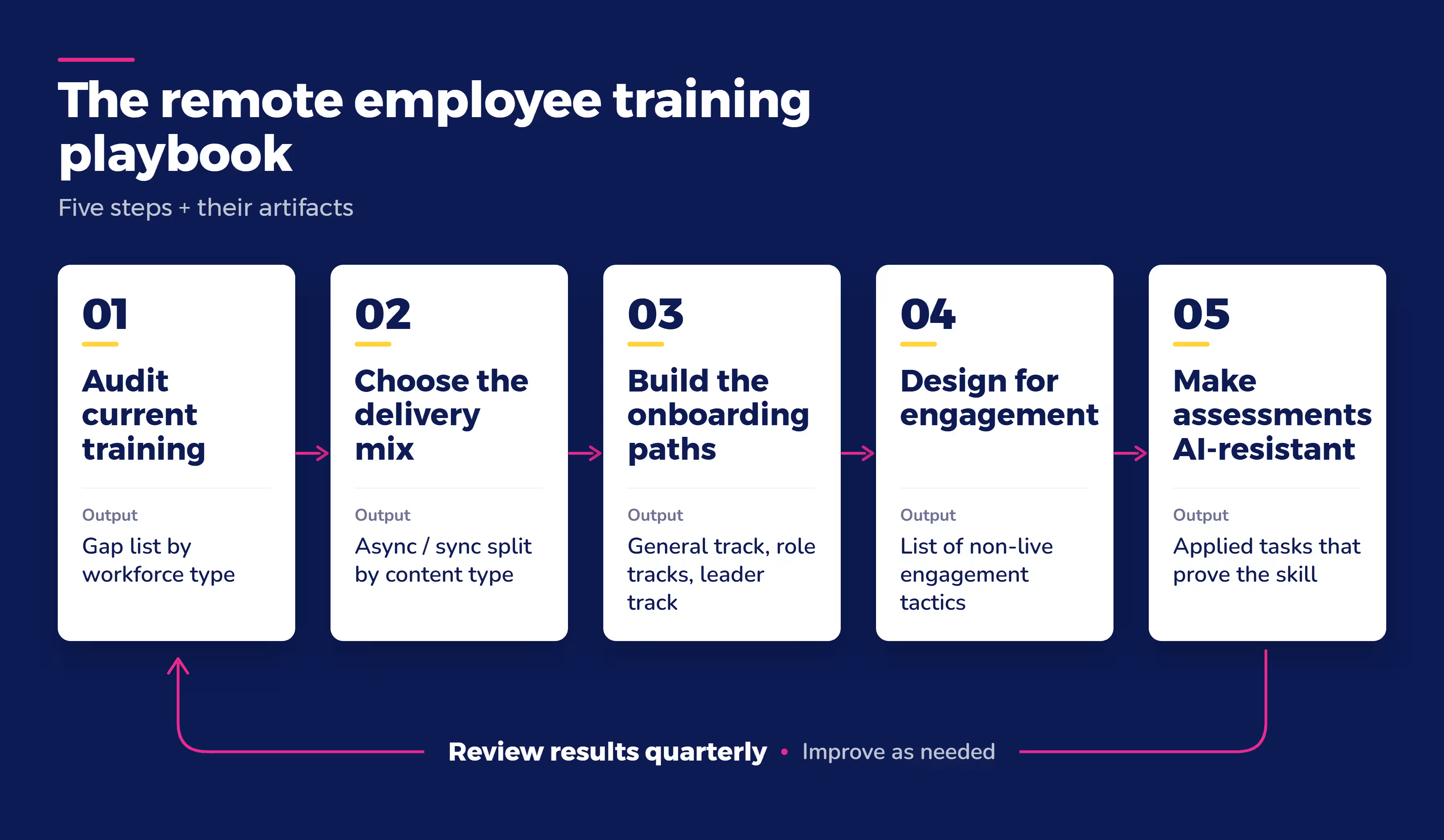
Audit your current training and where it breaks down
Start by mapping what you have against each of the three workforce types. Where does your current onboarding assume someone is sitting in the office? Where does your compliance training assume a manager can walk over and check on progress?
While you're auditing, figure out which skills are actually shifting for your teams.
Don't try to overhaul everything at once. According to SHRM, 87% of CEOs expect AI to require widespread upskilling and reskilling in 2026, so the skills gap you're solving for today may look different in a year.
Pick the two or three skill areas that matter most right now and build those first.
Choose your delivery mix
Choosing between asynchronous vs. synchronous training is one of the biggest decisions in this playbook.
Live, synchronous sessions work well for discussion-heavy topics, complex questions, and building relationships early in onboarding.
Self-paced, asynchronous training works better for reference material, policy content, and anything employees need to revisit later.
"Async onboarding content is invaluable for remote and global employees because it means people can learn at their own pace. But some parts of onboarding need to stay human, so new employees have the opportunity to ask questions in real time at the start of their employment journey, to feel like there's a real person on the other side. You just can't replicate that with async content."
- Maria Curtis, Senior Talent Acquisition Coordinator, Absorb
Litmus, an email marketing platform with a dispersed, remote sales team, used to run mandatory one-hour live training sessions every week over Zoom. Salespeople had to stop their work to attend, and it wasn't sustainable as the team grew.
Litmus moved to a blended model built on Absorb LMS, with weekly learning paths employees could complete on their own schedule. Completion rates rose by 5% within the first few months of the switch. Salespeople now train and revisit courses when it fits their day, instead of losing an hour every week.
Build role-specific and general onboarding paths
Onboarding remote employees well starts with resisting a single, one-size-fits-all path.
A general onboarding path forces every new hire through the same content, whether they're joining engineering or sales. Build a general track that covers company-wide basics, then layer in role-specific and leadership-specific paths on top.
Absorb built its own onboarding this way. The company's more than 600 employees work mainly remotely worldwide, so its HR team built a general onboarding track alongside a separate leader track, and embedded diversity, equity, and inclusion training directly into the process.
The result: a 28% reduction in employee attrition, a 50% increase in employee satisfaction, and 20% faster time to productivity, according to Absorb's own internal data.
Two mistakes show up often in this step. The first is relying entirely on mandatory live sessions, which doesn't scale as your team grows. The second is building a training program once and never revisiting it.
This second mistake especially hurts compliance-related content, which needs regular refreshes to stay current and defensible in an audit. Build a review cadence into the program from the start, not as an afterthought.
Design for engagement without mandatory live sessions
Remote employee engagement doesn't have to mean more live meetings. Gamification in remote training — completion badges, friendly leaderboards — gives remote employees visible progress and recognition.
Absorb uses this in its own onboarding: new hires earn completion pins and see leaderboards for training like its DEI curriculum, with visibility that extends all the way up to company leadership.
Short, focused lessons help too. Microlearning for remote training lets employees fit a five-minute lesson between meetings instead of blocking off a full hour.
Peer-to-peer and social learning is a specific, real tactic here, not just a buzzword. Give employees a way to connect with each other around learning, not just with a manager or a course. It helps build the sense of belonging that's harder to create remotely.
Absorb's own onboarding uses social learning tools for this purpose, pairing new hires with peers and building in connection points beyond the required coursework.
Build assessments that hold up even when employees can lean on AI
AI in remote employee training cuts both ways. It can speed up how fast you build content, but it also gives employees a new way to fake their way through an assessment — and nobody's in the room to notice.
Roughly 52% of U.S. employees say they've used AI tools to complete mandatory work training, according to HR Dive, reporting on a survey from Moodle. That includes answering hard questions, completing parts of an assessment, or having AI take the whole thing.
Assessments still matter, but multiple-choice knowledge checks alone aren't enough.
Ask employees to apply what they learned to a real scenario from their job, or have a manager confirm the skill shows up in actual work, not just in a quiz score.
Compliance training for remote employees in regulated industries
Compliance training gets harder once your team is distributed. Informal systems based on proximity, like a sign-in sheet at a live session or a supervisor's mental checklist of who's due for what, no longer hold up. Automatic tracking has to be built into the system deliberately.
Digital audit trails
There's no one walking the floor to confirm training happened, so audit trails have to be digital from the start.
A compliance-ready remote training setup needs automated tracking and sign-off, so nothing depends on someone remembering to follow up.
Certification renewal cycles across time zones
Certification renewal dates are easy to lose track of when your team spans time zones and nobody's checking a shared wall calendar. The same problem applies to hybrid workforce training: a hybrid employee's compliance record needs the same digital trail as a fully remote one's, even on the weeks they're in the building. Build reminders around recurring renewal cycles instead of relying on memory.
Further reading: Best ways to track certifications with training management software.
Risk-based training, not one program for everyone
83% of organizations give all employees ethics and compliance training. Separately, only 34% say that training is tailored to each employee's risk profile, according to Corporate Compliance Insights, reporting a benchmark survey from Rethink Compliance.
Most companies train everyone the same way, whether or not the content actually applies to their role.
Match training depth to actual risk, and keep reporting ready to hand an auditor without assembling it by hand.
Absorb runs its own compliance-adjacent training this way internally. Policy acknowledgments are tracked automatically through Absorb Analyze, including digital sign-offs. The company's diversity, equity, and inclusion curriculum runs on a 60-day completion deadline that's tracked the same way.
This is Absorb's own internal practice, not a customer example, but it shows what automated tracking looks like in daily use.
How to measure remote training effectiveness
A remote employee training program that only tracks completion rates is measuring the wrong thing.
Completion tells you someone clicked through a course. It doesn't tell you they learned anything, or that they can apply it on the job.
It's also easy to game. an employee can technically finish a course without absorbing the content.
Look at behavior, not just completion
The Kirkpatrick Model, the standard framework training teams use to measure effectiveness, makes this distinction directly.
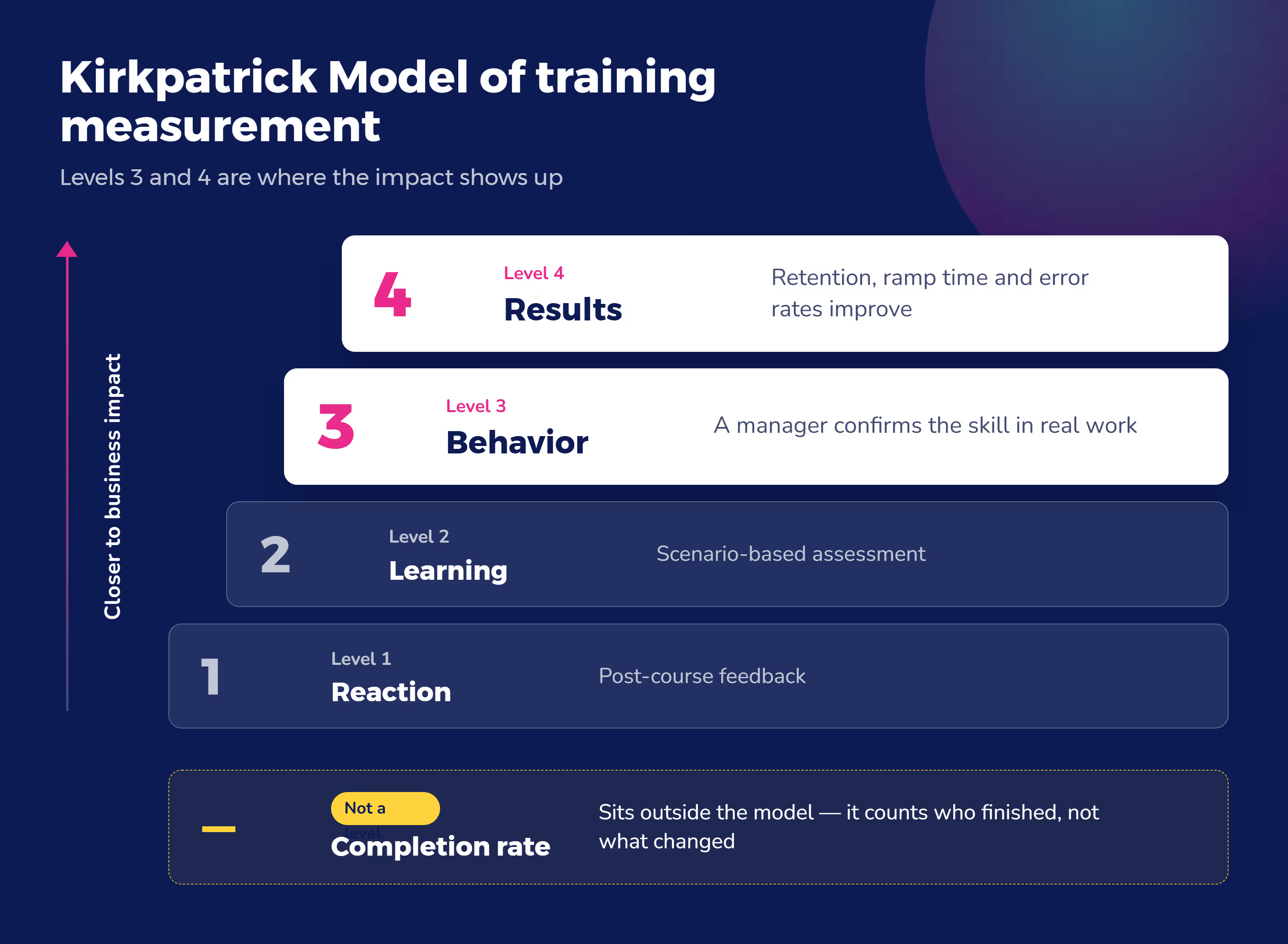
Level 3 of the model is about behavior: "it is not enough to learn something, or be informed of something, application of the learning must be applied when the participant is back in their environment."
Level 4 goes further, measuring "real performance results, not just training completion."
Have managers assess whether the skill shows up in real work
Ask managers whether they see the skill show up in actual work, not just whether the course got marked complete.
This can be informal. Have them review the employees’ work for signs of the training lessons.
Or ask employees about the training in their 1:1s or team meetings. What were their biggest takeaways? What did they like or not like about the course? What will they do differently now that they’ve taken it?
Talk about ways the employee can use their new skill in their work to achieve a promotion or other professional milestone.
Track downstream business outcomes
Track downstream numbers like retention, ramp-up time, or error rates, not just who finished a course.
When I Work, a scheduling and workforce management company that became a remote-first organization, used Absorb LMS to save more than $32,000 in ramp-up costs for its Customer Care team in the first year alone.
It also trained more than 20 new Customer Care agents over two years without sacrificing ramp-up time or customer satisfaction. Absorb's own onboarding revamp cut attrition by 28% and improved satisfaction by 50%.
None of these are completion-rate numbers. They're business outcomes.
What to look for in an LMS for training remote employees
Picking an LMS for remote teams comes down to five things:
- Delivery flexibility for both live and self-paced training, since you’ll need both
- Integrations with the tools you already use, like Microsoft Teams or ADP or Hubspot, so training fits into existing workflows
- Automated compliance tracking, which will make audit reporting easier
- Reporting that goes beyond completion rates, showing your leaders the value of quality remote training
What drives the cost
Cost for an LMS or other remote training solution typically varies based on your seat count, whether you need built-in content authoring tools, and your support tier, so there's no single number that applies to every company.
What matters the most is whether the platform replaces a patchwork of video calls and shared documents with one system that tracks, delivers, and reports on training consistently.
Absorb MS is built around these needs. It connects to HR systems like ADP to automate onboarding activities, tracks compliance sign-offs automatically through Absorb Analyze, and includes Absorb Create for building custom training content without relying on outside developers.
Frequently asked questions
What's the difference between training remote employees and training people in the office?
Remote training has to work without physical presence to reinforce it. In an office, culture and expectations get absorbed through hallway conversations and watching how things get done. Remote employees need that context built into the training itself, along with more deliberate check-ins to close the trust gap that comes with not being in the same room.
How do I onboard a new remote employee without in-person training?
Build a general onboarding track that covers culture, tools, and expectations, then layer in role-specific content. Combine self-paced material with scheduled live touchpoints, like a manager check-in or a CEO welcome session, so the new hire gets both structure and human connection in their first weeks.
What tools or software do I need to train remote employees effectively?
At minimum, you need a learning management system that supports both live and self-paced content, tracks completion and compliance automatically, and integrates with the communication tools your team already uses. Video conferencing and messaging tools support live sessions, but they aren't a substitute for a system that tracks progress and reporting.
How do you keep remote employees engaged during training?
Use gamification like completion badges and leaderboards to make progress visible. Build in peer-to-peer or social learning opportunities so employees connect with each other, not just with a course. And don't rely only on mandatory live sessions, which get harder to sustain as your team grows.
How is training remote employees different from training hybrid teams?
Fully remote employees need training that deliberately builds connection and culture, since they don't get it by being in the office. Hybrid employees need training that feels the same whether they're logged in from home or sitting in a conference room, so nobody gets a lesser version depending on where they are that day.
Start with your weakest program
Building (or rebuilding) your remote training program doesn’t have to take months. Start with a simple audit.
Which of the three workforce types do you have to manage? Fully-remote, hybrid, or returning to work?
Start with whichever one has the weakest program today.
Then use our playbook to put a system behind that program. You’ll need a platform that gives you the delivery flexibility, automated compliance tracking, and reporting covered above.
If you don’t already have one, give Absorb LMS a try. It supports training across a fully remote, hybrid, or returning-to-office workforce. Get your demo today.