

Employee certification tracking is the process of recording which certifications each employee holds, when each one expires, and what they need to do to renew it. Done well, no one works with a lapsed credential, and you can prove compliance when you need to.
Most teams start with a spreadsheet. It records the expiration date and stops there.
But that means renewals depend on someone remembering to check a column, and an audit often turns into a panicked search for certificates buried in email inboxes and shared drives.
Tracking completion is only half the job. The other half is getting people renewed before a certification lapses, and having the records ready to prove it.
If you're the HR, compliance, safety, or L&D leader keeping certifications current across roles or sites, this guide is for you. You’ll get a six-step setup that works with any tool and a breakdown of which type of certification tracking software fits your team.
What is employee certification tracking?
An employee certification tracking record covers the basics: the employee's name, the certification, who issued it, the date they earned it, when it expires, proof (usually a certificate file), and its current status.
.avif)
Certifications come from two places. Some are earned in house, like a safety course or an internal sign-off on a task such as an equipment checklist. Others are earned outside your organization, like a nursing license, a first aid card, or a forklift or crane certification.
You'll sometimes see certification tracking grouped under the broader label of training tracking software, but the two aren't quite the same. Training tracking tells you who finished a course. Certification tracking also manages the certificate, the expiration date, and the renewal that follows.
Most organizations need both in one place, like an LMS (learning management system).
Ownership usually splits three ways. HR or compliance sets the rules for who needs what certification. Managers act on what the system tells them. Employees keep their own certifications current.
Managing certifications well means more than watching expiration dates. It means knowing who needs what, collecting and approving proof, getting people renewed on time, and reporting on all of it.
Why spreadsheets stop working for certification tracking
A spreadsheet can hold a date. It can't remind anyone, enroll anyone in a renewal course, or hand an auditor a report. It depends entirely on one person remembering to check it.
Common failure points:
- An expiry column nobody checks until something goes wrong.
- Certificates saved in email inboxes, on paper, or across a dozen shared drives.
- Different sites or departments keeping their own version of the sheet, with no single source of truth.
- No record of who was reminded, or when.
- A compliance report rebuilt by hand every time an audit comes up.
Any one of these is manageable on its own.
But, a team usually outgrows a spreadsheet through some combination of things: multiple sites, roles with different requirements, certifications earned outside the organization, or an auditor asking for records fast.
According to OSHA, many OSHA standards explicitly require the employer to train employees in the safety and health aspects of their jobs. Falling behind on tracking that training is a compliance risk.
As Mike Avery, Absorb's VP of Product Enablement, puts it:
"When you manage compliance content [like certifications] outside of your LMS, you're taking on an enormous administrative burden that's largely invisible — until something goes wrong. For harassment prevention training alone, there are general requirements for both supervisor and employee specific trainings and many state-specific requirements triggered by employee population. This can lead to over 20 course permutations to track, update, and maintain..."
Five Guys JV Ltd. ran into this before moving to an LMS to track its certifications and training.
Its regions each ran their own learning systems and relied on paper-based reporting, which created gaps and irregularities across the business. In-store, certification checklists for stations like the fry station and the grill were tracked on paper too. After centralizing training and certifications in Absorb, compliance course completion rose from 70% to 96%.
Further reading: Managing compliance training at scale
How to set up employee certification tracking in 6 steps
Whatever tool you use, the process is the same: know who needs what, keep the record and proof in one place, remind people before they expire, get them renewed automatically, and report on the results.
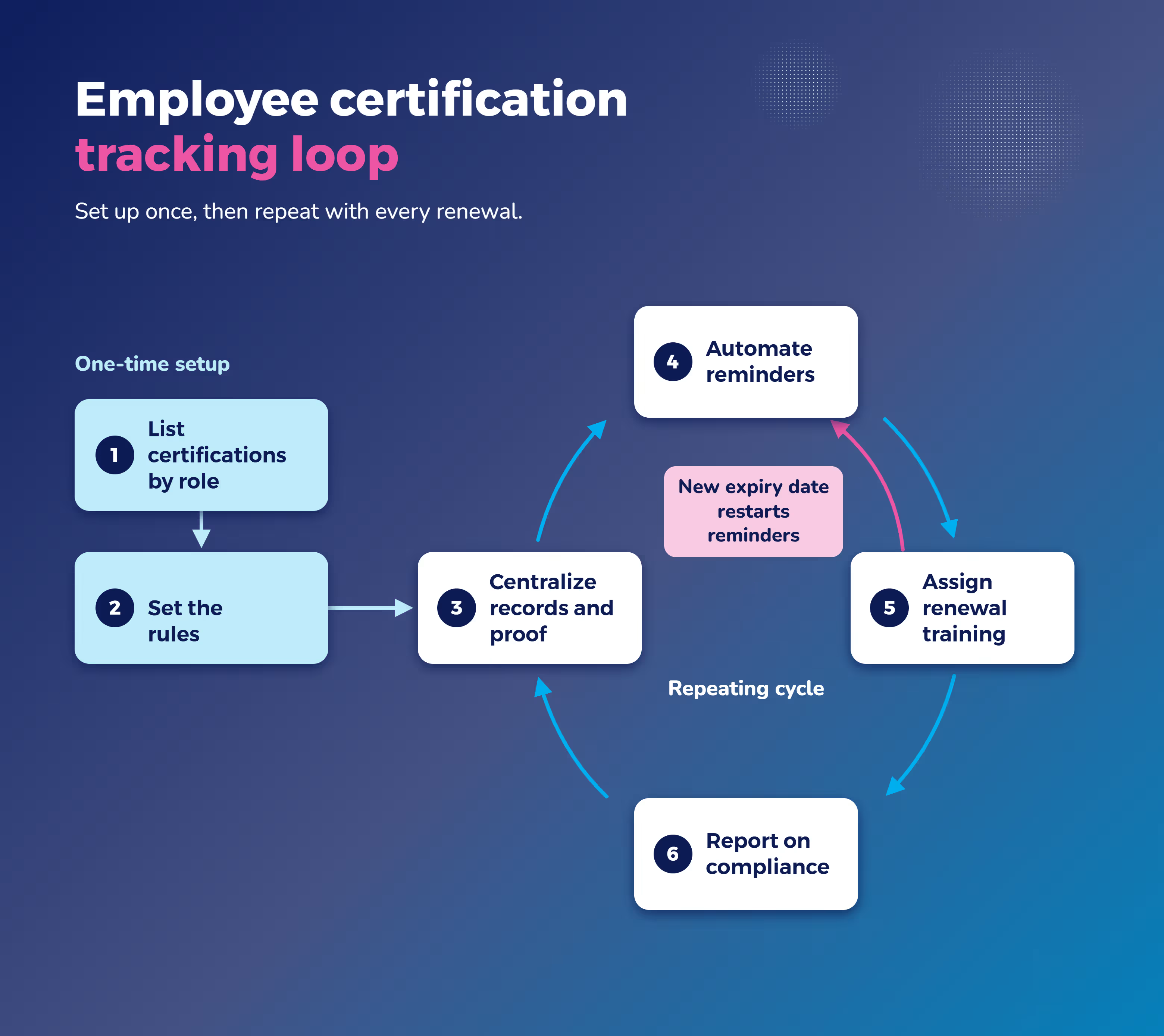
1. List every certification each role needs
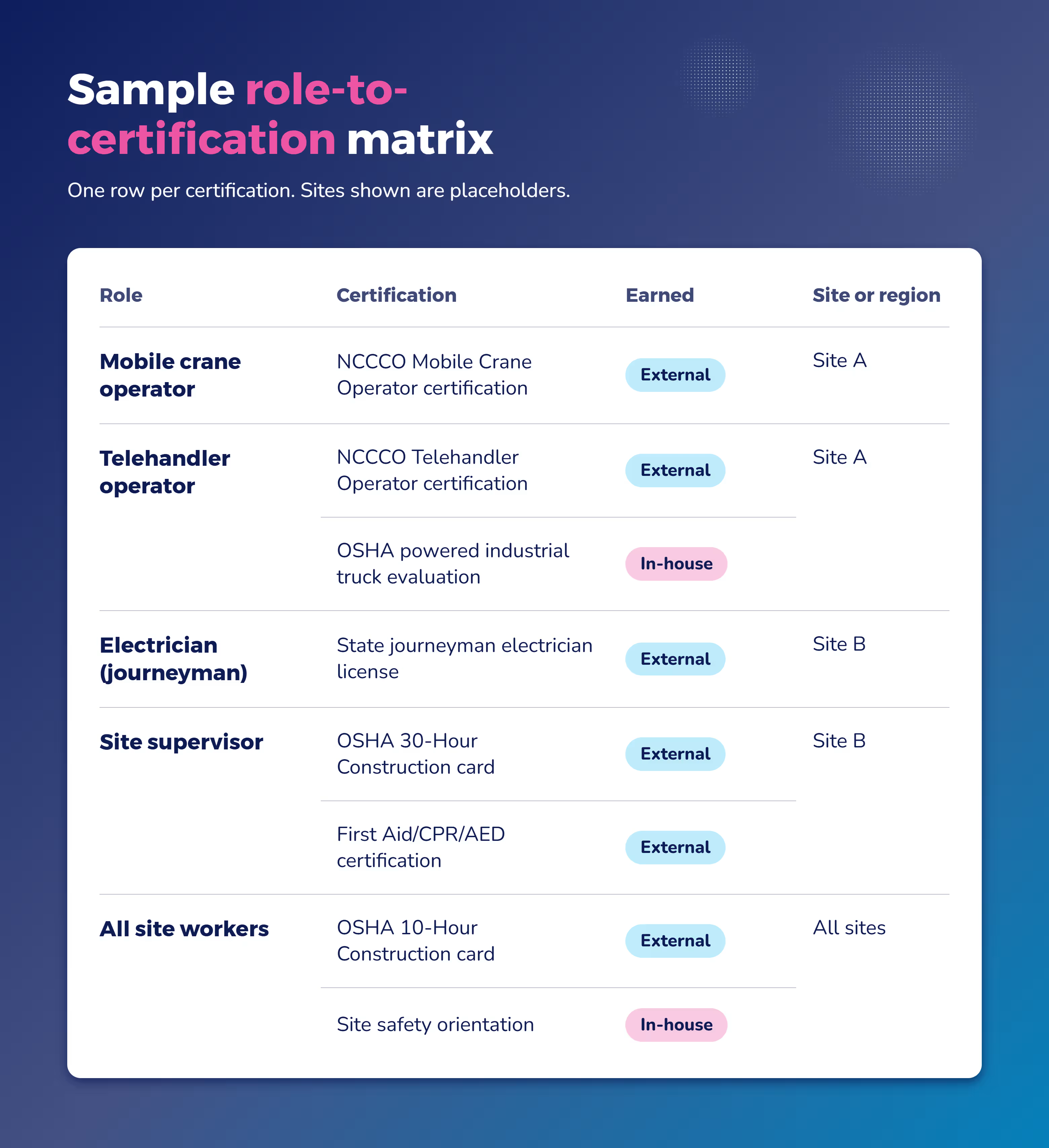
Start with a matrix: role, required certification, and site or region. Include certifications earned in-house and certifications earned outside your organization.
The list will look different depending on your industry. Here's an example from the construction industry.
A clinic tracks licenses and clinical credentials. Under federal Medicare rules, the nursing service must have a procedure to ensure that hospital nursing personnel for whom licensure is required have valid and current licensure.
A construction site or manufacturing plant tracks safety and equipment certifications instead, like forklift or crane operation. OSHA requires employers to ensure that each powered industrial truck operator is competent before they operate one.
Build this list once, by role, and every new hire or transfer should inherit the right requirements automatically.
2. Set the rules for each certification
For each certification, decide who needs it, how long it's valid, how someone renews it, and what happens if it lapses.
Renewal cycles vary widely.
OSHA requires a performance evaluation of each forklift operator at least once every three years. That's a re-evaluation cycle, not a certificate with a fixed expiration date.
An accredited crane operator certification, by contrast, is valid for five years.
OSHA's forklift standard also spells out what the record should include: the operator's name, the training date, the evaluation date, and who conducted it. That's a useful template even outside forklift training.
Assign these rules by role, not by person, so new hires and transfers pick up the right requirements without anyone setting them up by hand. Absorb LMS can auto-assign required training based on role, location, department, and hire date from your HRIS.
Disclaimer: The rules and cycles above are examples, not legal advice. Requirements vary by state and industry and change over time, so confirm the current rule with your compliance or legal team before you rely on it.
3. Keep every record and certificate in one place
Good training records management means every certification lives in one system, with the certificate file attached, whether it was earned internally or externally.
The same goes for a contractor's certification or a continuing education credit for a licensed role.
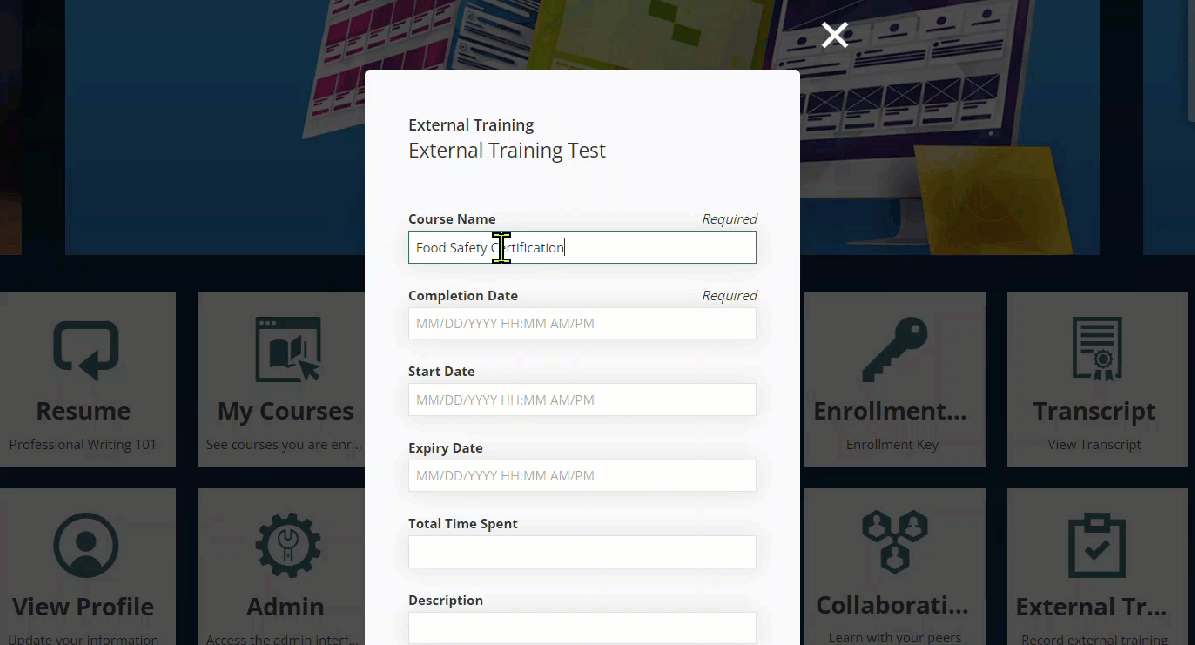
For anything earned outside your organization, let employees upload their own proof, then route it through an approval step so someone confirms it's genuine and current.
In Absorb LMS, for example, the External Training feature lets learners upload their certification through the External Training Tile.
Give employees a view of their own certifications and renewal dates too. It's a small thing, but it cuts down on how many reminders HR has to send by hand.
4. Automate reminders before certifications expire
Set reminders on a schedule that gives people enough time to act, whether that means booking a renewal course or scheduling a re-evaluation.
Add a second notice as the date gets closer, and copy the employee's manager so it isn't only on one person to notice.
Decide in advance what happens at expiration, too.
Some organizations flag the employee for follow-up. Others pull them from certain tasks or lock them out of scheduling until they're current again.
Waiting until the date arrives puts that decision under pressure. Deciding it now means the system carries it out the same way every time.
5. Assign renewal training automatically
Most tracking tools skip this step.
Instead of just alerting someone that a certification is expiring, have your system enroll them in the renewal course or evaluation the moment a set window opens, for example 30, 60, or 90 days before expiration.
Reminders go out on the same schedule, and if the deadline slips, it escalates to their manager.
When the employee finishes, the new certificate and expiration date update on their own, and the cycle resets. The old record doesn't disappear. It stays on file, so your audit history shows every certification someone has held, not just the current one.
This only works if the same system that tracks the certificate can also deliver or schedule the training behind it. That's why a standalone tracker usually can't close this step on its own. A good LMS should handle this automatically.
Absorb LMS, for instance, does it through its Re-enrollment and Re-certification settings. You set a time before the certificate expires and turn on automatic re-enrollment.
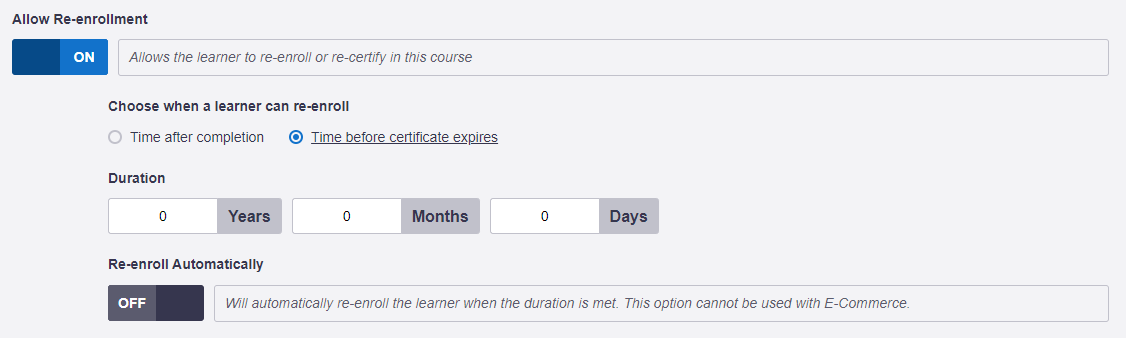
From there, Absorb sets the recertification window, re-enrolls the learner, sends reminders on your schedule, and escalates to their manager if the deadline slips. It keeps past enrollments as Historic Enrollments; it doesn’t overwrite them.
6. Report on certification status before the audit
At any moment, you should be able to see, by site, role, and person, who's current, who's expiring soon, and who's already expired, without digging through a spreadsheet to find out. You can build a report for yourself to see this, or you can use a pre-built one in your LMS.
Absorb LMS's Certificates Report, for example, shows each certificate's expiration date and how many days remain before it expires, and reports export to CSV or PDF, or hand an auditor a live dashboard view directly.
A complete audit trail includes the training records, certificate files, completion and expiration dates, reminders sent, and approvals, all timestamped. Managers should be able to see who on their team is behind, so they can follow up before it becomes urgent, not after an audit flags it.
Which kind of certification tracking tool fits your team?
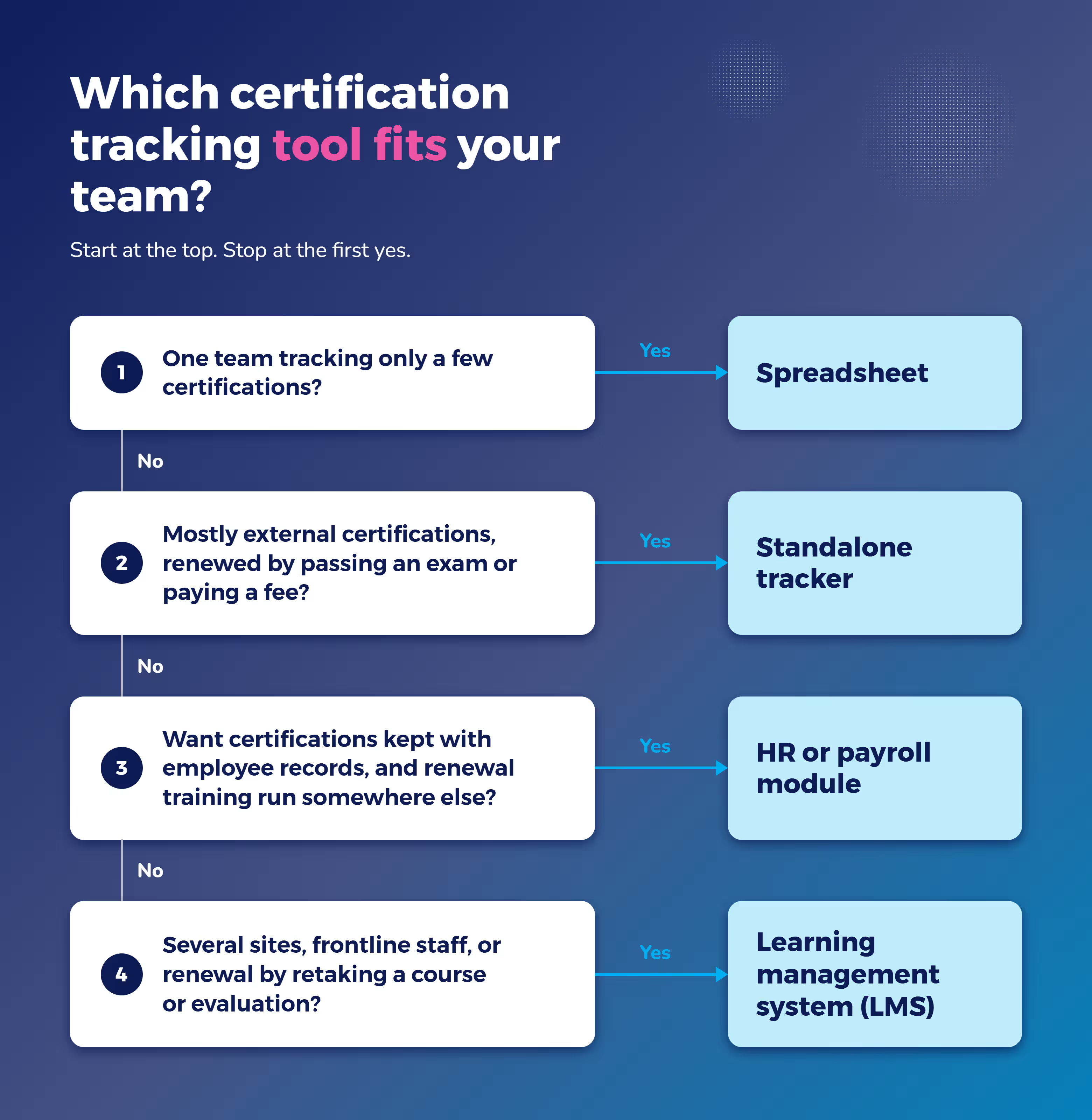
Which employee certification software is right for you mostly comes down to how many people, sites, and certification types you're managing.
Tool type | Best for | Tracks dates and proof | Sends reminders | Delivers renewal training | Audit reporting |
Spreadsheet | A single team with a handful of certifications | Yes | No | No | Manual |
Standalone certification tracker | Teams tracking a few externally renewed certifications, like a license or first aid card | Yes | Yes | No | Varies |
HR or payroll module | Centralizing records alongside employee data | Yes | Partly | No | Varies |
Learning management system (LMS) | Multiple sites, frontline roles, and certifications that renew by retaking a course or evaluation | Yes | Yes | Yes | Yes |
Spreadsheets and free templates
A spreadsheet or a free template is fine for a small team with a handful of certifications and one clear owner. It's free, familiar, and quick to set up. It just stops at recording the date, so it works only as long as someone keeps checking it by hand.
Standalone certification trackers
These tools are built around expiration dates and reminders, and they're usually quick to set up.
They fit well for certifications that renew outside your organization, like a professional license renewed by exam or a first aid card from an outside provider, where you're mainly tracking a date rather than delivering a course. Most stop there.
Delivering the actual renewal training still happens in a separate system, which means someone has to connect the two manually.
HR or payroll modules
If your certifications already live next to other employee data, an HR or payroll module can work as a central record.
In practice, these tools are built for record-keeping first: reminder features are often basic, and renewal training typically has to happen in a separate system.
A learning management system (LMS)
An LMS can run the entire employee certification loop: it tracks the certificate, sends the reminder, enrolls the employee in the renewal course, captures the new certificate, and reports on all of it.
That makes it the strongest fit for organizations with multiple locations, frontline roles (especially where turnover is high), and certifications that renew by retaking a course or evaluation, not just by paying a fee or filing a form.
Absorb LMS covers each part of that loop:
- Re-enrollment and Re-certification settings tie renewal to certificate expiration.
- Automatic Enrollment Rules enroll people in the right course automatically, including by role, location, department, and hire date from your HRIS.
- External Training captures certifications earned outside the platform.
- The Certificates Report shows what's expiring and when.
- HR system integrations such as Workday, ADP, UKG, and BambooHR mean role and department changes carry over automatically. (Some of those integrations run through an add-on, so confirm what's included on your plan.)
A G2 reviewer said: "Absorb allows us to bulk download certificates, automate reminders and escalations, and the reporting dashboard allows us to oversee compliance really easily."
Note: An LMS takes more to set up than a standalone tracker. But for teams that also need to deliver the renewal training, not just track the date, that kind of certification tracking software tends to pay for itself.
What certification tracking looks like in practice
Here's how two healthcare organizations put the six steps into practice, plus what changed once they stopped depending on spreadsheets and manual checks."
ATI Physical Therapy: Credentials tied to scheduling
ATI Physical Therapy performs dry-needling treatments across more than 850 clinics, and by law, only credentialed therapists can perform or bill for the service. Before setting up a formal system, tracking who held credentials was slow, inconsistent, and hard to audit.
ATI built a tiered credentialing program in Absorb LMS. Therapists upload a certificate for the base tier, then complete quizzes and submit video proof for the advanced tier.
Enrollment rules gate access between tiers, and badges tied to scheduling access update automatically. The system timestamps every certificate upload, badge award, and scheduling permission for the record.
The results:
- 100% compliance for dry-needling services across all 850 clinics
- 6 consecutive months with zero adverse events
- 7.7% increase in net patient revenue, partly from a new service line the credentialing program made possible. As one team member put it, "No more spreadsheets. No more manual checks."
Juv'ae: Nurse registrations tracked without missed expiries
Before working with Absorb, Juv'ae's nurses couldn't reliably record their continuing professional development points or catch expired certifications, both legal requirements for keeping their registration current.
Now, Absorb LMS tracks nurses' insurance, professional registration, and first aid certifications in one place, and handles in-person competence checks through Observation Checklists.
The result: 100% compliance with national registration tracking and documentation.
Features to look for in certification tracking software
Whatever you choose, look for employee certification tracking software that covers these seven things:
- Rules by role and location. Certifications should attach automatically based on someone's job and where they work, not get set up person by person.
- Expiry reminders with manager escalation. A reminder that only reaches the employee is easy to miss. It should reach their manager too, once the deadline is close.
- Automatic enrollment in renewal training. The reminder should come with something to do, not just a warning.
- Outside certificate upload with approval. Employees need a way to submit certifications earned elsewhere, and someone needs to confirm they're valid.
- Employee self-service view. Letting employees see their own certifications and due dates means fewer "am I current?" questions for HR, and a record that's already audit-ready when someone asks.
- Audit-ready, exportable reports. You should be able to produce a compliance report on request, not rebuild one from scratch.
- HR system integration. When a role or location change syncs automatically, certification requirements update with it.
Build your certification list this week
Tracking a certification is only half the job. The other half is getting people renewed before it lapses, and having the records ready the moment someone asks for them.
Start this week with the first step of the employee certification tracking loop: build the list of who needs what, by role. Once that's in place, you'll have a clear view of what your current tools can handle and where they fall short.
If you're managing certifications across multiple sites, or roles where renewal means retaking a course or evaluation, see how Absorb LMS handles employee certification tracking and renewal through the entire loop.