.jpg)

The fastest way to improve an online course is to use your LMS data to find where learners drop off or miss questions, then fix one problem at a time. Most online courses don't need a full rebuild, they need a diagnosis and one of three fixes.
And those three fixes are simple: teach one concept at a time, match the media to the task, and make learners do something. Any one of them can move a course from good to great, which is good news if you own workplace training, like compliance, onboarding, product, or customer courses, and don't have a lot of spare time or a big production budget.
Start with the part of your course that's losing learners, then measure whether your change worked. Attention is scarce, too. People frequently report difficulty sustaining attention to online lectures.
How do you improve an online course?
To improve online courses, find where learners struggle in your LMS data, then use whichever of the three ways fits the problem. Measure the same signals afterward so you know the fix worked.
- Teach one concept at a time: cut what's irrelevant and chunk what's left
- Match the media to the task: use video where it shows something words can't, and make sure everyone can use it
- Make learners do something: add decisions, knowledge checks, and practice
Each section below stands on its own, so skip to the one that matches your problem. If you're building a course from scratch rather than improving one, start with how to create an eLearning course instead.
Where is your online course losing learners?
Your LMS already shows where a course fails, so check four signals before you change anything. Course data is good at this kind of diagnosis. It can identify learners at risk of withdrawing before they drop out.
Treat each signal as a clue to check. The table shows the likeliest cause to look at first and which of the three ways to try.
Signal | Likely cause to check first | Way to try |
|---|---|---|
Learners quit at the same module or screen | It may be too long or not relevant | Way 1: cut and chunk |
Most people miss the same quiz question | The content may be unclear, or the question may be | Way 1 or 3: clarify the content or rewrite the question |
High completion, no change on the job | Content may be passive, with no practice | Way 3: add decisions and practice |
Comments like "too long" or "can't hear the video" | Likely a media or accessibility problem | Way 2: fix the media, add captions |
Ask learners directly, too, with two or three focused questions at the end of the course. Choose questions that tell you what to fix next. For workplace behavior, a quick manager check-in a few weeks later shows whether anything stuck.
The course to fix first is the one with the most learners and the worst signal. That's often a compliance or onboarding course — the kind everyone has to take and nobody asked for.
In Absorb LMS, the Course Activity, Learner Progress, Assessments, and Course Evaluations reports cover most of these signals, and Absorb Engage polls collect quick feedback. Aura Admin Assist lets you ask for a report in plain language, like everyone who didn't pass this quarter's compliance course.
1. Is your course trying to teach too much at once?
The first way to improve an online course is to teach one concept at a time. If learners quit partway through, cut anything that doesn't serve the course goal, then chunk what's left.
Focus on just one concept per screen or module. Don't overwhelm learners with too much at once; after all, we humans learn best in small, bite-sized pieces.
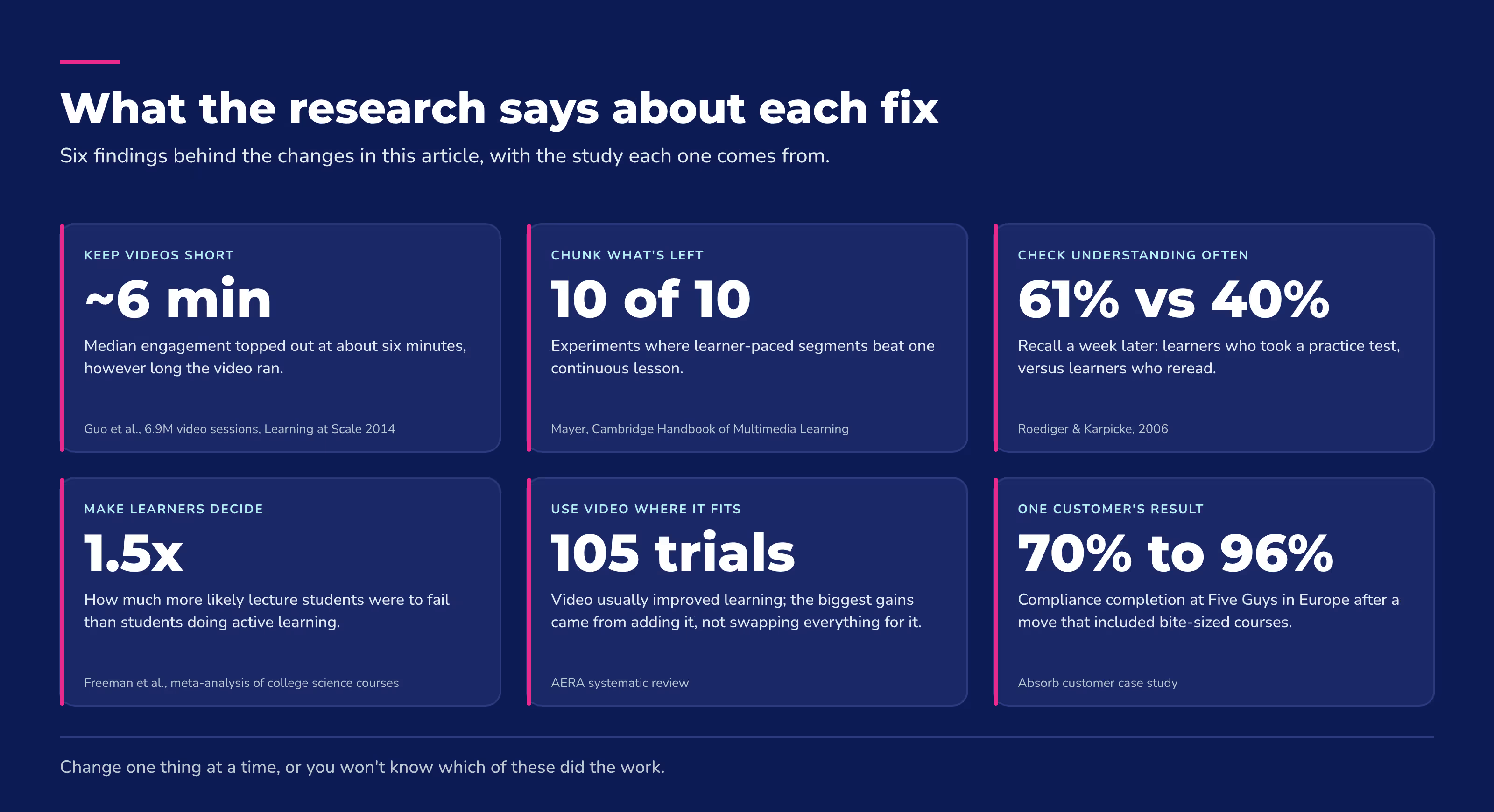
People learn more deeply from learner-paced segments than from one continuous lesson. That finding held up in 10 out of 10 experiments.
Consider turning an hour-long course into six 10-minute courses. An onboarding course, for example, can split by first-week task: day-one systems, the first customer call, and logging hours.
Sequence matters as you chunk. Open with the basics if learners are new to the topic, then let concepts build as the content gets more complex.
Every screen should earn its place. If it doesn't help someone do the job or pass the check, cut it.
Keep videos short, too. In a study of 6.9 million video sessions, median engagement time topped out at about six minutes, no matter how long the video ran.
Let AI handle the first redraft. Aura Create turns an updated source document, like a revised policy or your course notes, into a new draft. Upload the file, paste a prompt, or connect SharePoint or OneDrive, and it drafts an outline and content for you to refine.
Absorb Create's PowerPoint conversion turns that hour-long slide deck into an editable course you can split up.
Five Guys in Europe saw compliance course completion rise from 70% to 96% after a switch that included bite-sized courses. When it moved from paper and disconnected systems to Absorb, it also shifted to bite-sized learning, often under 20 minutes. Shorter courses were one ingredient in that change, not the sole cause.
Microlearning is the wrong choice when a skill needs long, sequenced practice. Don't slice a complex procedure into fragments that only make sense together.
2. Does every lesson in an online course need video?
Not every lesson needs a video. The second way to improve an online course is to match the media to the task, and video earns its place wherever it shows something words can't.
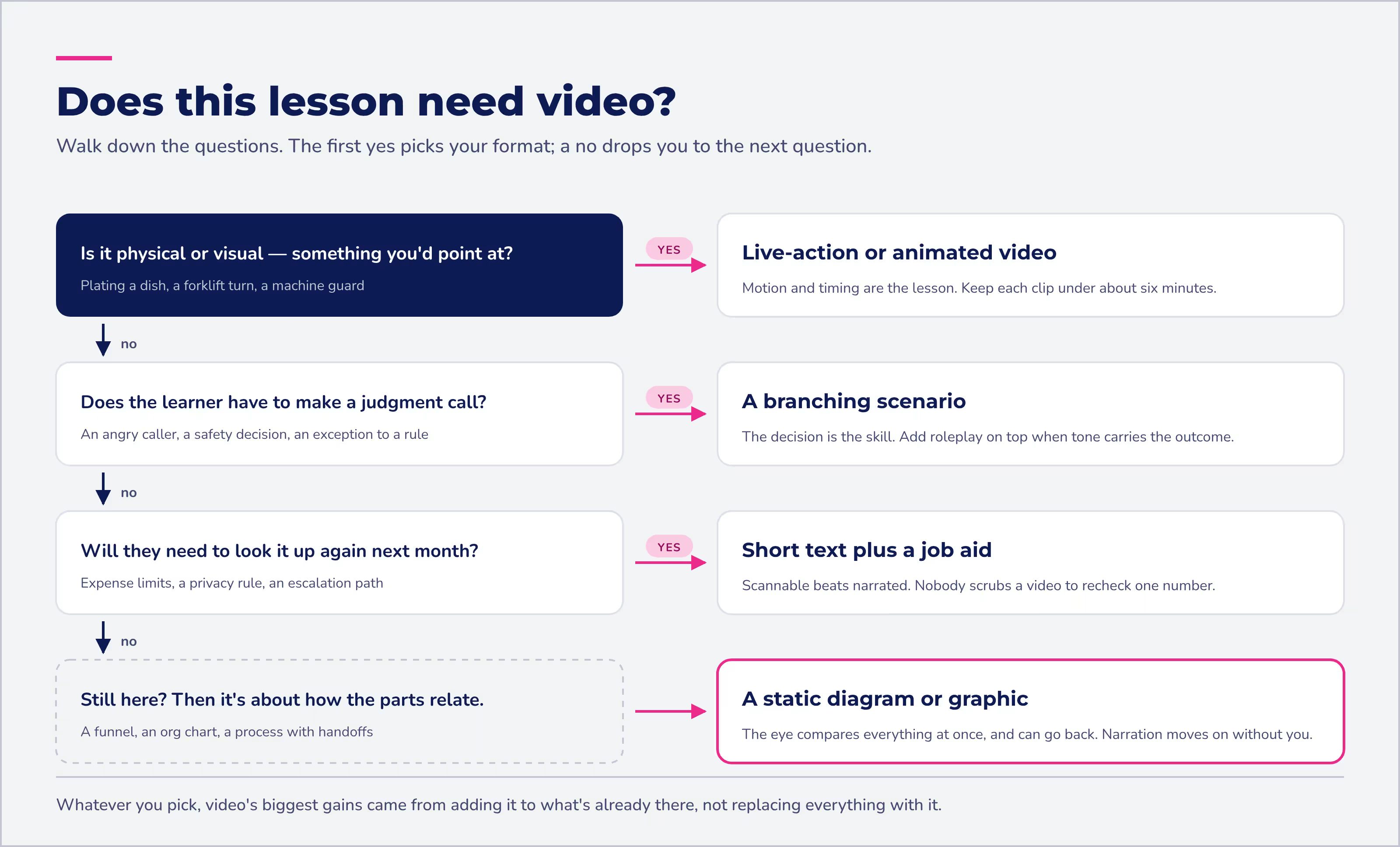
A review of 105 randomized trials found that video usually improves learning, and the biggest gains came from adding video to existing teaching rather than swapping everything for it.
Text often does the job for policy and reference content. In one head-to-head trial, learners liked video more without learning significantly more than learners who read text.
Video shines for anything physical or visual. How can you train someone to cook the perfect omelette without showing a video, or step-by-step images of the process?
Strong courses mix media to fit the task:
- Live-action video
- Animated video
- Static or animated graphics
- Photos, illustrations, and graphs
- Audio files
- Job aids and materials linked outside the course
Using media doesn't require a big budget or years of experience like it used to. Don't shy away from using a smartphone and an external microphone.
The popular chart claiming people remember 10% of what they read and 90% of what they do is a myth. Those percentages have no research behind them.
Choose media because it fits the task, not because of a chart. And if you're not feeling confident in your video creation skills or you're intimidated by the heavy lift of quality sound design, Absorb Create's AI voiceover narrates courses to keep the sound consistent across different course authors.
Can everyone use your online course?
Captions, transcripts, readable contrast, and keyboard navigation fix problems for more learners than you'd guess. People who are Deaf or hard of hearing need captions, and so does anyone in a loud environment or a place where sound can't be on. That's a warehouse floor, a busy restaurant kitchen, or a break room during someone else's lunch.
W3C also notes that captions help people who read a language better than they understand it spoken, which matters for a multilingual frontline team.
Start with these fixes on your existing course:
- Add captions to video and transcripts for audio
- Write alt text for images that carry meaning
- Check color contrast
- Make sure the course works with a keyboard alone
- Remove instructions that rely on color alone ("click the green button")
Use WCAG 2.2 as your standard. If you work in or for a US federal agency, Section 508 requires captions for prerecorded and live video. Absorb Create supports closed captioning, alt text, and keyboard navigation. For building accessibility into a new course, see how to create an eLearning course.
3. How do you make online courses more engaging?
To make online courses more engaging and interactive, give learners something to do, like decisions to make, frequent questions to answer, and practice that looks like the real job. Cut passive click-next screens wherever you can. Active learning consistently beats listening, at least in a large meta-analysis of college science courses, where lecture students were 1.5 times more likely to fail.
Interactivity is the glue that binds your content together, which makes it the third way to improve an online course. In a self-paced course, decisions and quick questions are how you hold learner engagement without an instructor in the room.
Use branching scenarios for decisions that matter
Branching scenarios let learners "choose their own adventure" and practice decisions in a safe place. Take forklift safety training. Rather than just hearing or seeing how to safely operate a forklift, the learner watches a video scenario and chooses the safest actions to take.
The same works for a customer complaint. A learner hears an angry caller, picks a response, and sees how the call goes.
A bad pick costs nothing but a do-over. Absorb Create supports branching scenarios, so you can add one to an existing course.
Add knowledge checks throughout, not just at the end
Short questions spread through a course do more than grade people. Researchers call it the testing effect: taking a practice test improves long-term retention, not just assessment. In one study, tested students recalled 61% a week later, versus 40% for students who only reread the material.
Quizzes spread through online lectures also reduced mind wandering and improved learning. So sprinkle true or false, matching, and multiple-choice questions throughout your content, not just at the end. Absorb Create can generate quiz questions from your course content, and you can edit and refine them.
Let people practice the conversation, not just read about it
Roleplay builds the skills that only show up under pressure, like handling a customer who's upset. Aura Rehearse (coming soon) will let people roleplay those moments in scenarios built from your own training content, then get feedback on what worked and what to try differently.
Give people a reason to talk about what they learned, even in a self-paced course. Add a discussion prompt, or ask managers to follow up. For live sessions and gamification, see 10 ways to make virtual training more engaging.
Can AI help improve an existing online course?
Yes. AI speeds up all three ways by handling the slow parts: drafting quiz questions, updating content after a policy change, narration, and translation. A person still needs to check accuracy and decide what to cut.
AI does well | Still needs a person |
|---|---|
Drafting quiz questions from content | Checking the answers are right |
Turning an updated policy doc into a draft | Deciding what's no longer relevant |
Narration and voiceover | Judging tone for sensitive topics |
First-pass translation | Reviewing for local accuracy |
The human check isn't optional. NIST's Generative AI Profile names confidently stated but false content as a core risk of generative AI.

At Absorb, two tools split the work. Aura Create redrafts or updates a course from your own documents: upload a file, paste a prompt, or connect SharePoint or OneDrive. Absorb Create, with Create AI built in, handles hands-on fixes like AI-generated quizzes, AI voiceover, and PowerPoint conversion. Its commenting and approval workflows give reviewers a place to catch errors before launch, and its built-in AI tools can help add translations.
An authoring tool built into your LMS saves the export-and-upload step every time you make a fix, which is worth weighing when you compare online course creation software.
How do you know your course improvements worked?
Compare the same signals before and after, and change one thing at a time so you know what worked. If you shorten the modules, add video, and rewrite the quiz all at once, you won't know which of the three ways reduced drop-offs or improved quiz results.
Test each fix with a simple before-and-after. Say most learners quit your onboarding course at module three. Split that module in two, leave everything else alone, and check the Course Activity report a month later.
If the quit point moves or disappears, the fix worked. If it doesn't, try the next most likely cause.
Look at:
- Where learners quit, and whether that point moved
- The quiz question most people used to miss
- What learners say in comments and evaluations
- How long the course takes to complete
- Whether people do the job differently (ask their managers)
The Kirkpatrick model gives you a simple ladder for this: reaction, learning, behavior, and results. Check reaction and learning soon after the course. If the goal is to change how people work, follow up later on behavior and the results your team cares about.
Set a review schedule for high-stakes content, too. Compliance and policy courses go stale every time a rule changes. Absorb Analyze can tie training programs to your organization's KPIs, so you can see whether a better course shows up in business results.
Frequently asked questions about improving online courses
What are 3 ways to improve an online course?
Teach one concept at a time, match the media to the task, and make learners do something with decisions, knowledge checks, and practice. Pick the way that fits where your course is losing learners, then measure the result.
How can we improve on the eLearning experience?
Start with your data, not a redesign. The best way to improve online learning is to find where learners quit or struggle, fix that one problem, and measure the result.
What activities make online workplace training more engaging?
The most engaging activities ask learners to do something instead of just watching. Use branching scenarios for decisions, knowledge checks to practice recall, and roleplay or job-like tasks to rehearse the real work.
How long should an online course video be?
Aim for about six minutes or less. In a large study of 6.9 million video sessions, median engagement topped out at about six minutes regardless of video length. For modules, teach one concept, then check understanding.
Is completion rate a good measure of a course's quality?
It's a start, not proof. People can finish a course without learning anything. Pair completion with assessment results and on-the-job behavior to see whether the course works.
Ready to take your course from good to great?
You don't need to rebuild an online course to improve it. Start with the course that has the most learners and the clearest trouble spot. Fix one issue with the way that fits it, then check the same signal a month later.
Absorb LMS reports help you find where learners quit or miss questions. Aura Create can draft revisions from your source documents, and Absorb Create lets you add knowledge checks.
For a closer look at these capabilities, see how you can turn good courses into great ones.