

LMS migration is the process of moving your course content, learner records, certifications, integrations, and configuration from one learning management system to another.
It's different from an upgrade, which simply updates the system you already have.
Whether you call it an LMS migration or an LMS transition, the stakes are the same: protecting the learning program you've built while moving it somewhere better.
If you're the one leading this decision — in L&D, IT, or compliance — this article will show you what separates a clean migration from a costly one. Plus, the 8 steps you need to follow to ensure a successful one.
Why consider an LMS migration for your organization?
Organizations migrate their LMS for a mix of reasons:
- User experience. According to Brandon Hall Group research, the need for better user experience is a top reason companies look to switch platforms, cited by 87% of those planning a change.
- Integrations. The current system cannot connect to the other tools the business relies on.
- Scale. A platform built for 500 users starts lagging, capping seats, or charging a lot more once you grow to a few thousand.
- Compliance. In healthcare and financial services, compliance training is frequently the reason migration gets budget approval in the first place. The current system cannot produce the audit-ready records regulators expect.
The upside is real and measurable when the move goes well. A Forrester Total Economic Impact study found a 490% return on investment and $11.8 million in net present value across the customers it studied. Migration is work, but it is work with a payoff.
The LMS migration process: a step-by-step framework
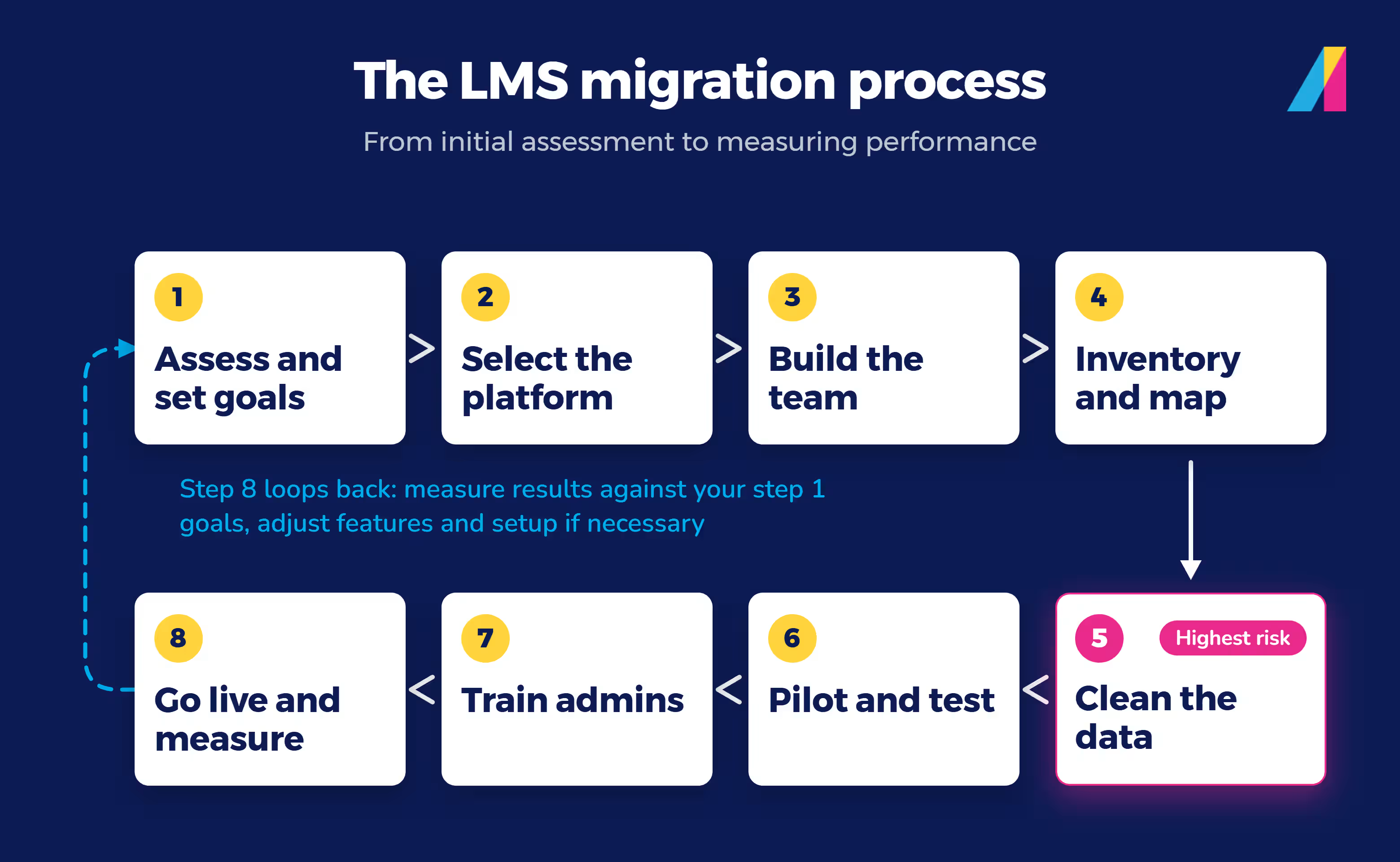
Every organization's migration looks a little different, but the reliable ones follow the same eight-step process. Use it as your LMS migration project plan, or as a straightforward LMS migration checklist.
1. Assess your current LMS and set migration goals
Start by recording what's not working: e.g., reporting gaps, integration failures, poor learner adoption, compliance risk. Then turn each problem into a goal for the new system.
For example, if compliance completion is currently stuck at 80%, your goal could be reaching 95%+ completion within the first two quarters. If onboarding takes too long because training is spread across disconnected tools, your goal could be cutting time-to-productivity by a set number of days. Framing goals this way gives you a number to check against once you go live, to prove to your boss it was worth the money and time investment.
As Anglique Kambylis, Senior Manager of Implementation at Absorb, says:
"The upfront time investment [of migration] is real, and it's worth keeping your long-term goal in view when it starts to feel heavy. Whether you're trying to cut administrative effort, tighten compliance, standardize training, or shorten onboarding, the work you do during implementation is the foundation those outcomes sit on. The organizations that see ROI fastest are the ones that stay focused on the business goal and make intentional decisions in service of it from day one."
2. Choose your new LMS and map requirements
Match your goals against what each LMS actually does, not just what its sales team says. A few ways to verify that:
- Ask for references from customers who've completed a similar migration, not just happy customers in general.
- Request a sandbox or trial environment and test your actual use cases in it, not just the demo script.
- Read reviews on sites like G2 or Capterra, and filter specifically for feedback on migration and support.
- Ask to speak directly with the vendor's implementation or migration team, not just sales, since they're the ones who'll actually do the work.
We won't rank specific platforms here — for the bigger evaluation criteria (integration support, compliance features, total cost of ownership), these five questions are a solid starting checklist. How the vendor handles data migration itself is a separate, migration-specific criterion worth adding to that list.
3. Build your migration team
You'll need people who own the technical move, the content, and the change itself. A small training team might combine two or three of these roles into one person; a larger enterprise usually needs a dedicated owner for each. We cover exactly who belongs on that team, and who should lead it, in the next section.
4. Inventory and map your data and content
List everything that needs to move: courses, learner profiles, completion records, certifications, quiz results, and any integrations tied to them. Map each item to where it will live in the new system before you touch a single record.
5. Clean and prepare your data before the move
This is where migrations can often go wrong. Outdated courses, duplicate learner profiles, and incomplete records don't get better by moving platforms. They just show up broken somewhere new.
The items most commonly missed here are integrations nobody remembers are still connected, and completion records for people who've since left the organization. Clean your data first, especially certification and completion records that need to hold up if a regulator or auditor asks for them later.
6. Test integrations and run a pilot migration
Before you move everyone, move a slice: one department, one course library, one integration. Confirm your single sign-on, HR system, and reporting tools all still work.
"Thriving launches are phased. They pilot with a real group of learners, refine based on what they hear, then roll out. Their department structure and user data are clean before anyone gets imported. They curate content instead of migrating all of it, and they have a plan for how they'll actually talk to learners about the change." – Anglique Kambylis, Senior Manager, Implementation, Absorb
The more integrations you have, the more this step matters. A migration with a handful of connected systems needs far less testing than one plugged into a dozen.
7. Train administrators before learners
Get your LMS administrators comfortable in the new system first. They'll be the ones answering questions and fixing small issues once learners arrive, so they need a head start.
8. Go live and measure post-migration results
Launch, then watch what actually happens: completion rates, login issues, support tickets. Compare it against the goals you set in step one. A migration isn't done at go-live. It's done when the new system is measurably working better than the old one.
Which step carries the most risk?
Step five, cleaning your data. A messy migration doesn't create new problems. It exposes the problems your old system already had. We go deeper on protecting that data in the next few sections.
Should you migrate all at once or in phases?
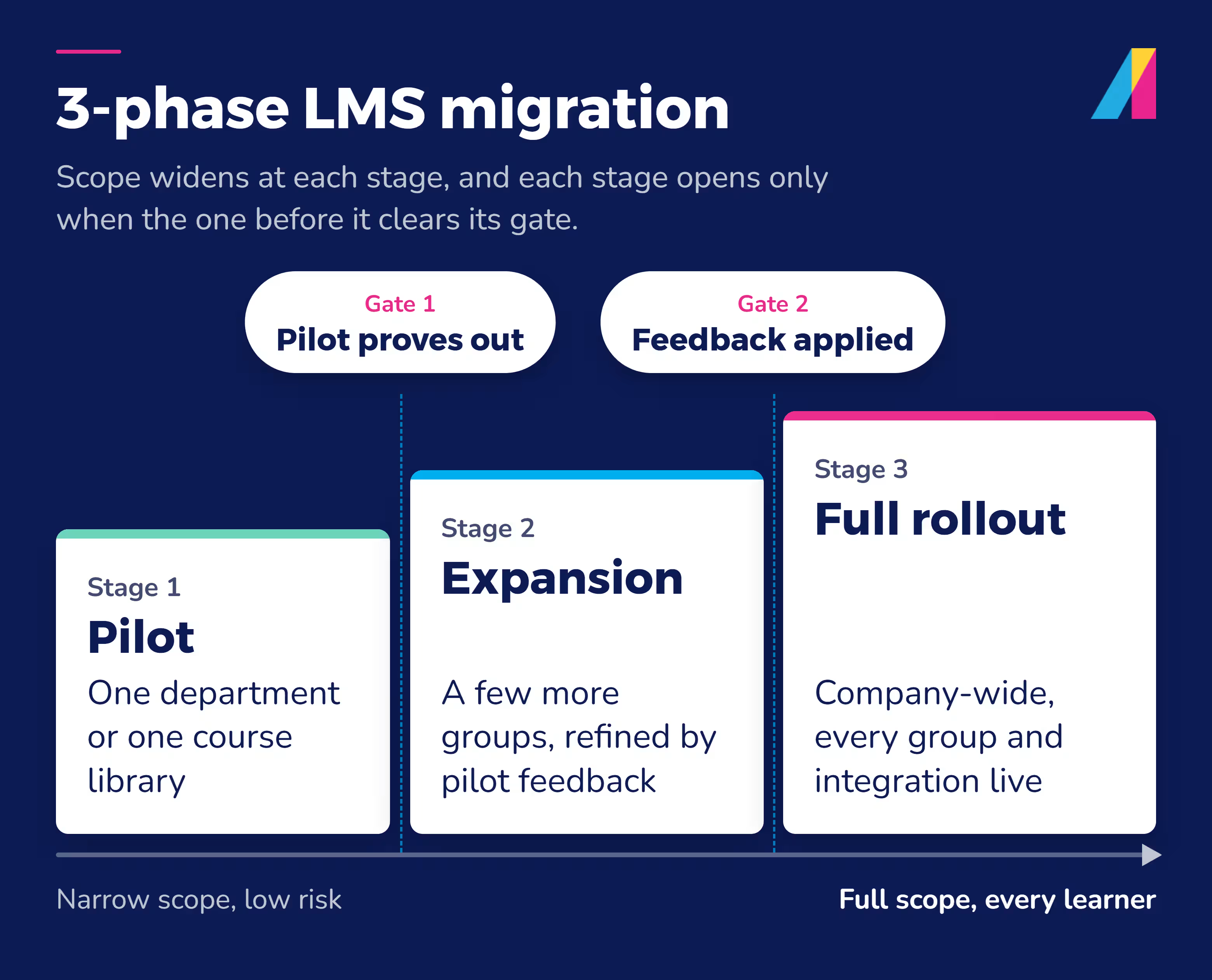
For most mid-market and enterprise organizations, phased is safer. That usually means three stages: a pilot with one department or course library, an expansion to a few more groups once the pilot proves out, and then a full company-wide rollout.
What drives LMS migration cost and timeline
We won't quote you a price here. How much a migration costs depends too much on your specific setup for any single number to be honest. What we can tell you is what actually moves the number, so you can have an informed budget conversation internally.
.avif)
What drives migration cost
The biggest cost driver is data volume. More learners, more historical records, and more course content all mean more to clean, map, and verify.
Content format determines how much rework you'll need, too. Courses built in standard formats like SCORM tend to move more easily than custom-built content you'll need to rebuild or convert.
The level of support your new vendor provides also affects your total spend. Some vendors handle much of the technical lift for you, which changes what your internal team needs to budget for.
What drives migration timeline
Integration count is the biggest timeline factor. You'll need to test and validate every system connected to your LMS — your HR platform, your single sign-on, your reporting tools — after the move, and each one adds time.
Your internal team's size and availability shapes the timeline just as much. A migration competes with everyone's regular workload. A team that can dedicate real hours to it will move faster than one squeezing it in around other priorities.
Who should be on your LMS migration team
A migration needs more people involved than most organizations initially plan for. Our guide to building an LMS implementation team breaks these roles down in more depth.
Core migration team roles:
- A migration lead or project coordinator who owns the timeline, keeps decisions moving, and is the single point of contact when something needs a call.
- A change management or onboarding specialist who prepares learners and managers for what's changing, and makes sure the rollout doesn't blindside anyone.
- A content or eLearning specialist who handles what actually gets moved: courses, learning paths, and the data tied to them.
- An LMS administrator who owns configuration, compliance settings, and user management in the new system.
- An IT or technical lead who handles integrations, data security, and the technical side of the data migration itself.
Should IT or L&D lead?
Neither owns it alone. L&D usually leads because the outcome is a training program, but IT needs real authority over the technical decisions, not just a seat at the table. Organizations struggle when one side is driving and the other is only informed after the fact.
How to communicate the change to employees and learners
Tell people what's changing before it changes, not after. Learners want to know if they'll lose access to completed courses or certifications during the switch. Give them a clear answer early.
How to protect data integrity and compliance during migration
Protecting data integrity during LMS data migration means treating two problems separately: what happens to your content, and what happens to your records. This is where a migration either protects your training records or accidentally damages them.
Check content and data portability (SCORM, xAPI, AICC)
Most course content is built on one of a few content standards: SCORM, xAPI, or AICC. (Here's more on what SCORM compliance actually means for your content.) Check for SCORM compatibility before you migrate. Content built to these standards is designed to move between systems without losing its structure or tracking data. Content built outside those standards typically needs re-authoring before it will run in the new system.
Preserve certifications and completion records
Learner history is the part of a migration you can't afford to get wrong. Completion dates, certification records, and quiz scores need to move over intact and stay tied to the right learner. This matters most in industries where a missing record can mean a lapsed license or a failed audit.
Account for compliance frameworks (GDPR, SOC 2, HIPAA)
If you operate in the EU or handle EU residents' data, GDPR gives learners the right to receive their personal data in a portable format and have it transferred to another provider. That right applies directly to learner data moving between LMS platforms.
SOC 2 evaluates whether a vendor's security, availability, and confidentiality controls hold up. It's worth confirming for both your outgoing and incoming LMS during a migration.
And if you handle protected health information, HIPAA's Security Rule sets specific requirements for how that data must be protected. Those requirements extend to how you handle it while it's in transit between systems.
What's the difference between migrating course content vs. migrating learner data?
These are two different migrations happening at once, and they carry different risks. Course content — videos, quizzes, learning paths — can usually be rebuilt if something goes wrong. Learner data can't. Completions, certifications, and compliance records often can't be recreated once they're lost. Verify them against your old system before you decommission it.
Data migration experts generally group migrations into a few types. An LMS migration mostly falls under content and database migration, since you're moving both structured records and the files tied to them, not just relocating where data lives.
Real LMS migration outcomes
Three Absorb customers show what a well-run migration delivers. (More customer stories are here if you want to see how other industries and team sizes handled it.)
Vivint: time to first referral -50%
Vivint, a smart home technology company, migrated from a custom-built, in-house learning system to Absorb LMS after being acquired by NRG Energy. The results were concrete: field technician training time dropped from 24–25 hours to 8–10 hours, time to production for new technicians fell from 68 days to 39 days, and time to first referral dropped nearly 50%, from 113 days to 58 days.
"We've gotten a lot out of Absorb. Our compliance completion has gone up, onboarding is faster, and our training is more engaging and effective." - Kendrick Schut, Vivint's instructional designer and LMS administrator
Rho: 97% training compliance
Rho, a clinical research organization operating in more than 25 countries, migrated from Moodle to Absorb LMS to support its global growth. The organization grew from 300 to more than 2,800 users while reaching 97% training compliance, and addressed GDPR and multi-country regulatory requirements along the way.
"Migrating from Moodle to Absorb enabled faster onboarding, eliminated manual tracking, and improved reporting for internal and external audits," the organization reported.
CMCC: better compliance record keeping
Canadian Memorial Chiropractic College (CMCC) migrated from an on-premises, internally hosted system to Absorb LMS to solve a familiar problem: a system that couldn't scale and needed its own hardware and IT upkeep.
"There were a lot of things I wasn't comfortable with," said Greg Roberts, CMCC's director of continuing education, describing the burden of maintaining the old system.
Centralized, reliable completion records mattered a lot, since CMCC's graduates sometimes need to prove course completion and competency to healthcare regulators.
LMS migration FAQ
What does LMS stand for?
LMS stands for learning management system: software used to deliver, track, and report on training. For a fuller explanation, see what a learning management system does.
How does LMS migration work for a large company with thousands of active learners?
The process is the same eight steps, but scale changes what matters most. Data volume and integration count both grow with your learner count, so testing and pilot phases matter even more. Vivint, for example, migrated roughly 10,000 employees, including 2,500 call center workers and 3,000 field technicians, by testing with role-based groups before rolling out company-wide.
Protect what you've built with a smooth LMS migration
LMS migration doesn't have to mean losing compliance history, guessing at cost and timeline, or taking a vendor's word that it can be done well. A clear project plan, the right team, and real attention to data integrity turn migration into a system your organization can actually grow into.
That's the same problem Absorb LMS customers have solved. Vivint cut technician training time by more than half after migrating off a custom-built system. Rho grew from 300 to 2,800 users at 97% compliance after leaving Moodle. CMCC moved off an aging on-premises system without losing the completion records its graduates need for licensing.
If you're still building the case for your own move, talk to our team about what a migration like yours would actually involve.