.jpg)

This enterprise software training guide explains what enterprise software training is and shows L&D leaders and project teams how to plan training, drive adoption, measure results, and help employees adapt to change.
What's enterprise software training vs enterprise resource planning (ERP) training?
Enterprise software training is the process of teaching employees how to use business software effectively. It covers everything from onboarding users to driving adoption, improving productivity, and helping employees adapt to new ways of working.
ERP training is one type of enterprise software training. It focuses specifically on Enterprise Resource Planning (ERP) systems such as SAP, Oracle NetSuite, or Microsoft Dynamics. Enterprise software training is broader and may include CRM platforms, HR software, project management tools, collaboration tools, cybersecurity applications, learning management systems, and other business-critical technologies.
In short, all ERP training is enterprise software training, but not all enterprise software training is ERP training.
People often confuse ERP and CRM because they both sit at the center of a company's operations. But they solve different problems. ERP focuses on the operational and financial processes that run the business, while CRM focuses on customer relationships, sales, and service.
Many companies run both, connected to each other. That overlap is part of why "ERP training" and "enterprise software training" blur together in search results.
ERP has a reputation for being hard to learn, though that's more about breadth than difficulty. A single ERP system touches procurement, finance, inventory, and reporting all at once. New users have to learn how their piece connects to everyone else's, not just their own tasks.
"EMS" isn't a standardized term the way ERP is. Depending on who's using it, EMS can mean an enterprise management system, an energy management system, or something specific to an industry. If a source compares EMS to ERP, check what they mean before assuming it's a recognized category.
Why is enterprise software training important to your bottom line?
Skipping or rushing training on new enterprise software has a cost. A year after launch, you can end up with an expensive system that a lot of employees route around.
According to a survey cited by SHRM, nearly one in four organizations say new HR technology rollouts fail to meet adoption expectations. Adoption, not the software itself, is usually the real point of failure.
This is part of why bigger companies budget for enterprise training as an ongoing function (the broader practice of teaching large, cross-functional workforces new tools and processes), not a one-off task tied to a single launch.
The stakes are also rising. Employees now work inside more systems than they used to, and every new platform adds another tool to learn on top of the ones they already use. That means more training touchpoints, not fewer.
Treating each rollout as a one-time event, instead of part of an ongoing training program, causes a common problem. Companies end up training the same skills, like project planning, data entry, and reporting, from scratch every time a new system arrives.
6 steps to plan an enterprise software training program
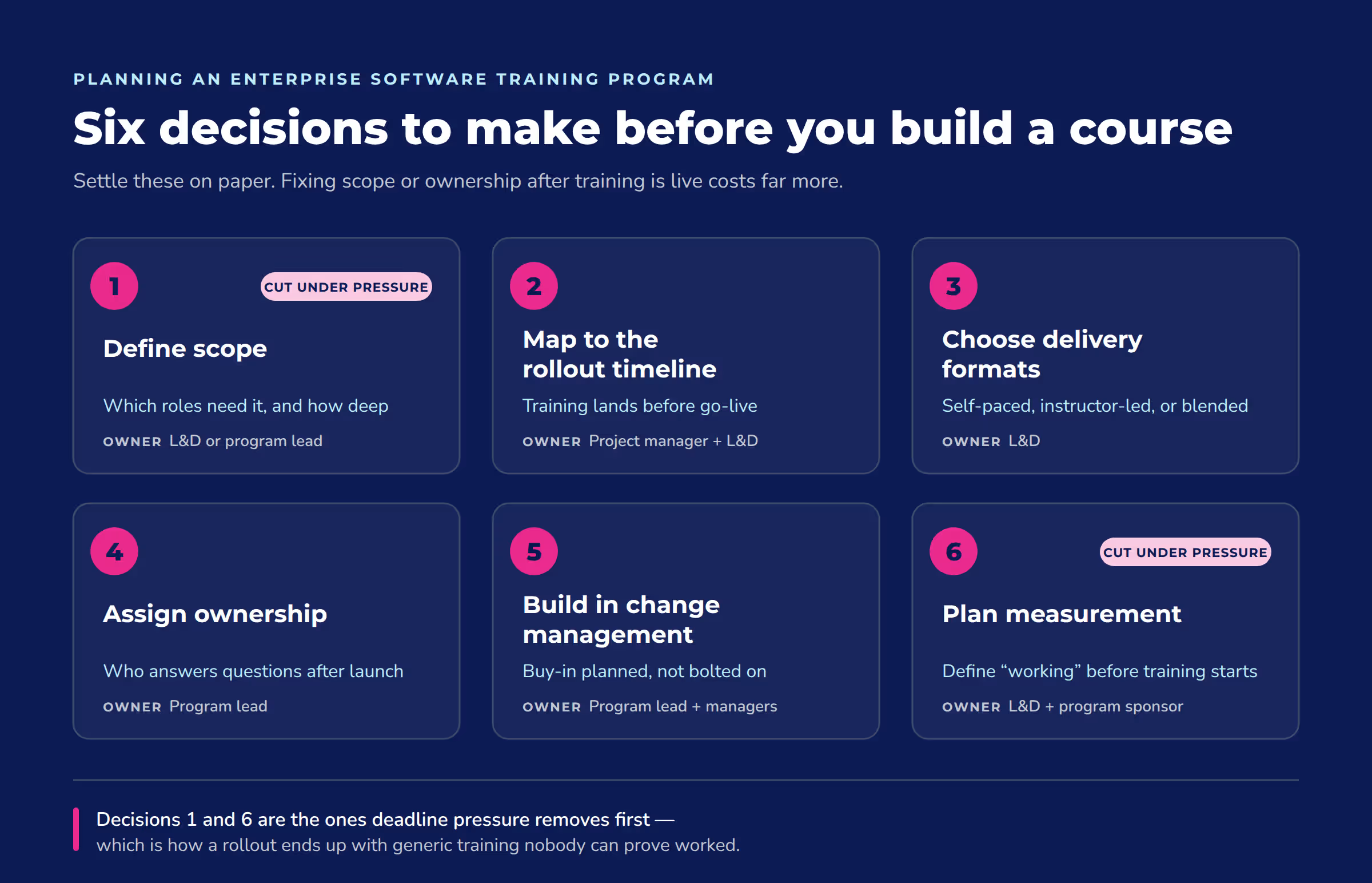
Planning enterprise software training comes down to six decisions: who needs training, when they need it, how they'll get it, who owns the program, how you'll handle the human side of the change, and how you'll know it worked.
Step | What it covers | Who owns it |
1. Define scope | Which employees need training and at what depth; role-based training beats one-size-fits-all | L&D or the program lead |
2. Map to the rollout timeline | When training happens relative to go-live, not as an afterthought once the system is live | Project manager and L&D |
3. Choose delivery formats | Self-paced, instructor-led, or blended learning, based on system complexity and team size | L&D |
4. Assign ownership | Who answers questions, updates content, and tracks completion after launch | Program lead |
5. Build in change management | Communication and leadership buy-in planned before go-live, not added after adoption stalls | Program lead and department managers |
6. Plan measurement | Decide what "working" looks like before training starts, so you can check later | L&D and program sponsor |
A few of these steps are easy to skip under deadline pressure, especially role-based scoping and measurement planning. Skipping them is how a rollout ends up with generic training that doesn't match what any team does with the software.
Role-based training matters because a finance team and a sales team using the same ERP system touch almost none of the same screens. Training everyone the same way wastes time and buries the parts each group needs. The same logic applies to onboarding new hires onto an existing system long after the original rollout ends.
Software implementations rarely fail because the software doesn't work. They fail because training starts too late, or treats the rollout like a single event instead of the start of an ongoing program. Mapping training to the implementation timeline, instead of bolting it on after go-live, is one of the simplest ways to avoid that.
Build change management in from the start, not as an afterthought. A widely used framework, Prosci's ADKAR model, breaks a successful change into five pieces: awareness, desire, knowledge, ability, and reinforcement. Prosci didn't design ADKAR specifically for software rollouts, but the same building blocks hold up for one. Tying that framework to a broader strategic learning system built around measurable business impact is what keeps training from reverting to a compliance checkbox once the rollout excitement fades.
How to measure ROI on enterprise software training
You measure ROI on enterprise software training by tracking how fast people get productive on the new system and how well they use it once trained, not by guessing at a percentage after the fact.
"Measuring product training effectiveness has to go beyond enrollments and completions…"
—Laura Malloch, Manager, Customer Enablement, Absorb LMS
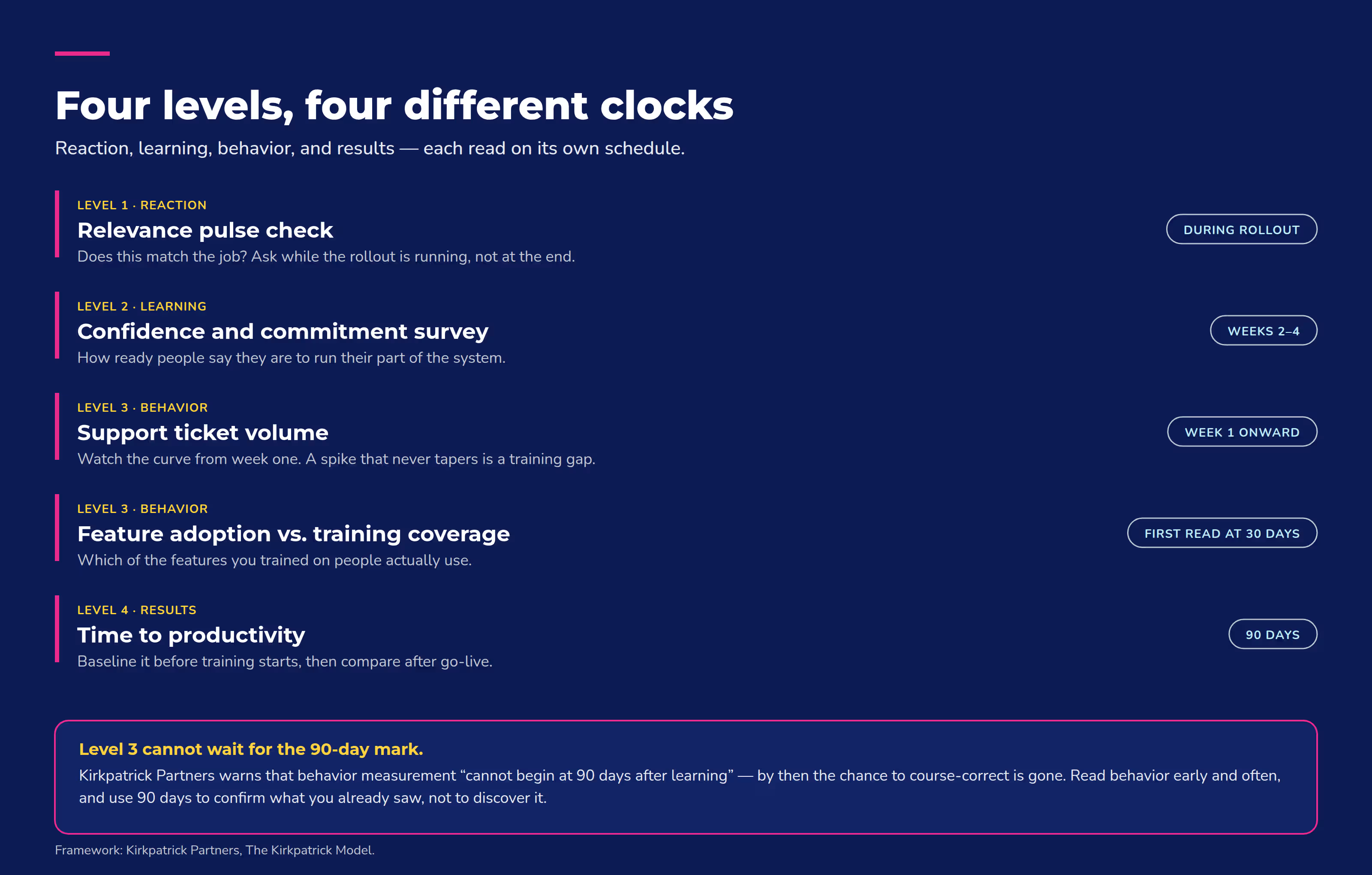
One well-established way to structure that measurement is a four-level framework: reaction, learning, behavior, and results. It moves from how people felt about the training to what changed in the business afterward. You don't need all four levels for every rollout, but skipping straight to results without tracking behavior first makes it hard to know why a number moved.
In practice, that means tracking things like:
- How long it takes new users to get comfortable running their part of the system.
- How many support tickets come in during and right after rollout. A spike that doesn't taper off usually means the training missed something.
- How many of the system's features people use a few months in, compared to what their training covered.
- How confident employees say they feel using the system, through a short survey a few weeks after training ends.
None of these need an outside benchmark to be useful. Track them before training starts, so you have a baseline, then check again a few months after go-live. A reporting tool built to tie training data to business KPIs makes this kind of before-and-after tracking realistic instead of a manual spreadsheet exercise.
Managing change during an enterprise software rollout
Training teaches people how to use new software. It doesn't automatically make them want to use it. That's what change management handles, and skipping it is why some well-trained employees go back to their old spreadsheet.
Prosci, a change-management firm, has spent 25 years collecting more than 10,800 survey responses from change-management professionals across 12 studies. Some of the practices that consistently rise to the top include: visible executive sponsorship, frequent communication, and support from frontline managers. None of these are training activities; they're what happens around the training.
On the ground, that means leadership uses the new system themselves, not just approves the budget for it. Employees need to hear why the change is happening before rollout day. And frontline managers need enough context to answer their team's questions, instead of just forwarding them to IT.
Feedback loops matter as much as messaging. If employees hit friction in the first few weeks and have nowhere to report it, they'll build workarounds instead of asking for help. Those workarounds are much harder to unwind than a training gap.
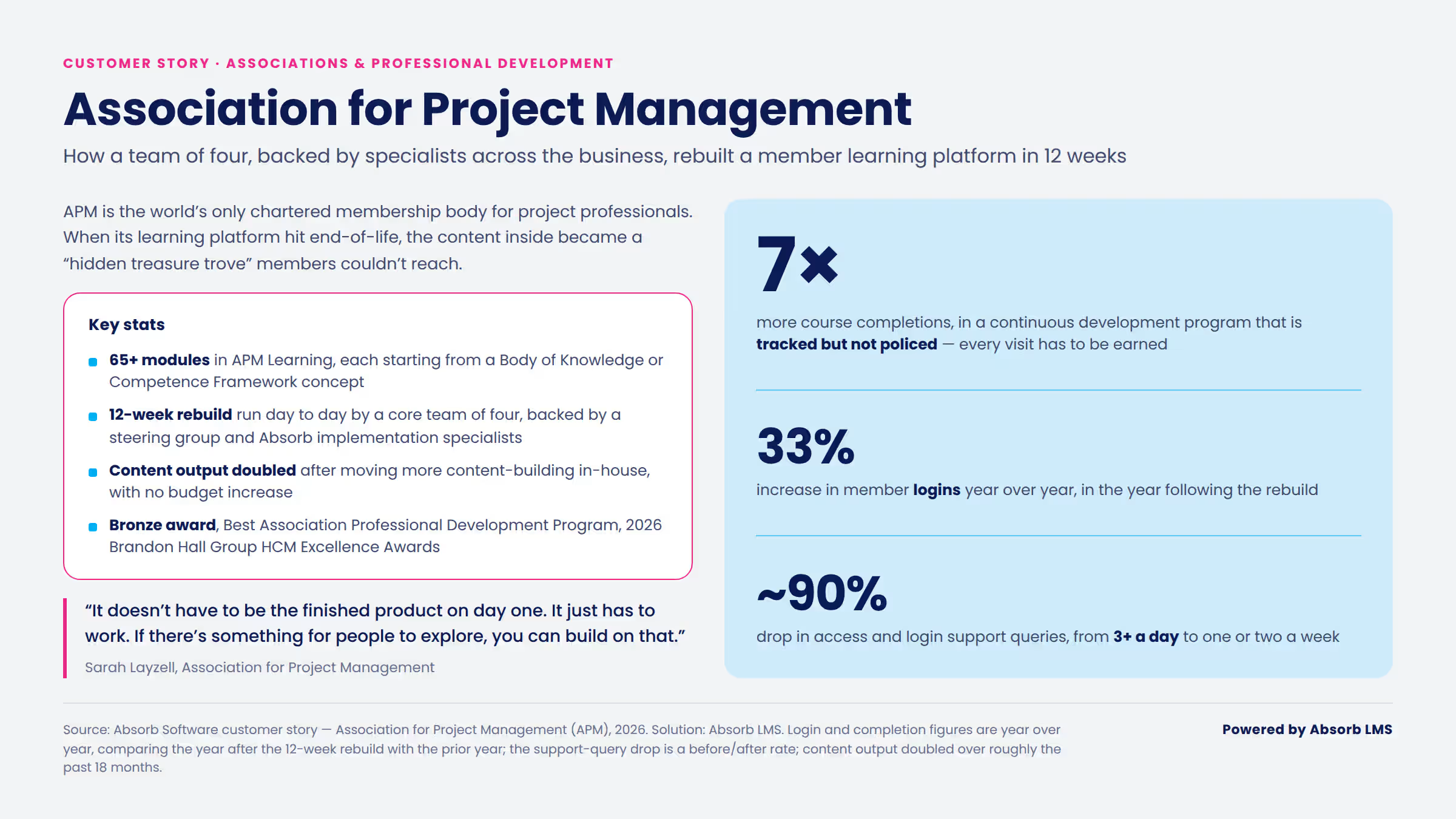
Read more about how APM and Absorb engaged a community.
The role of a learning management system in enterprise software training
A learning management system turns enterprise software training into an ongoing program instead of a one-time event. It's the place training lives. You track it and measure it there, across every system you roll out, not just the one launching this quarter.
Most companies aren't training on one enterprise system and calling it done. They're running an ERP system like SAP for finance, a CRM like Salesforce for sales, and an HCM platform like Workday for HR, often training different groups on different systems at different times. Treating each of those as a separate, disconnected effort means rebuilding the same tracking and reporting process every time. A single-purpose training tool or a course library can't follow you across systems the way a system of record can.
An LMS like Absorb LMS gives a company one place to build, assign, and track training across all of those systems, instead of juggling a separate process for each rollout — including pre-built connectors for systems like SAP SuccessFactors, Salesforce, and Workday, so training data doesn't end up stuck in a fourth, disconnected tool. That's also what makes the measurement approach from the ROI section possible in practice. You need something logging it centrally to track completion, feature adoption, or comfort level across multiple systems.
This supports enterprise learning and development more broadly, beyond any single software rollout. Once training and tracking live in one system, next year's implementation builds on the same setup instead of starting over.
Treat enterprise software training as an ongoing program
Enterprise software training is an ongoing program, not a single event tied to one system launch. It has to cover planning, measurement, and the human side of change across every enterprise system a company runs — and it's not the same thing as ERP training.
Companies that treat it that way stop rebuilding their training process from scratch with every new rollout. If you have a system rollout coming up, start with the six-decision framework above before you build a single course. It's faster to fix scope and ownership on paper than after training is already live.
Only an LMS built to run training across every system you use, not only the system launching this quarter, makes that ongoing approach possible. Absorb LMS gives you one place to build, assign, and track training as your systems change, so each new rollout builds on what's already there instead of starting over.
Frequently asked questions
What are the common challenges in enterprise software training?
The most common challenges are training that doesn't match what each role does, training that happens too close to (or after) go-live, and no plan for measuring whether it worked. Scalability is also a real challenge for companies training thousands of employees across locations, which is part of why role-based, trackable training beats one-size-fits-all sessions.
Can small businesses benefit from enterprise software training?
Yes, especially once a small business adopts a system built for scale, like an ERP or CRM platform meant for much larger teams. The same planning principles apply, but at a smaller scope, with fewer people to segment into roles.
How often should businesses update their training programs?
Update training whenever the underlying software changes in a way that affects how people use it. As a general guideline, review the full program at least once a year even without a major update. Software vendors push updates constantly, and training that no one revisits tends to go stale.
What are the benefits of scalable enterprise software training?
Scalable training means you can onboard 10 new hires or 1,000 without rebuilding the program from scratch. It also makes it easier to keep training consistent across locations and to track completion and outcomes in one place instead of piecing together reports from different teams.